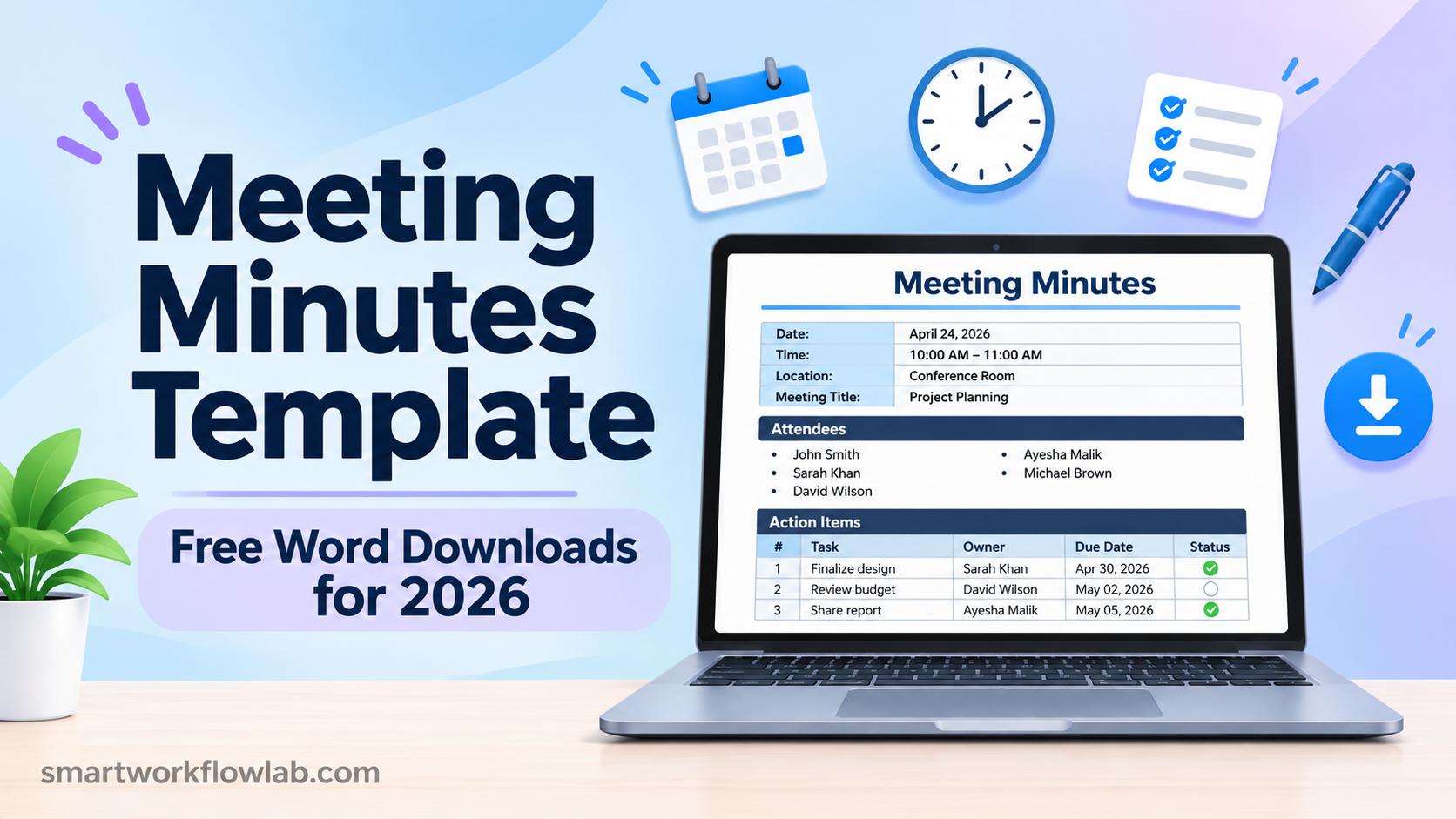
Download a free meeting minutes template for Word below. There are three versions: a team meeting template for weekly meetings, a formal template for boards and committees, and a one-page version for quick calls. Each one is an editable .docx file that opens in Microsoft Word, Google Docs and LibreOffice, with no sign-up.
Below the downloads you’ll find a preview of each template, filled-in examples for team and board meetings, how to record motions and approve minutes, and how to use AI to draft minutes without losing accuracy.
About these templates
- Made by our team in standard Word format (.docx), so they open in Microsoft Word, Google Docs and LibreOffice without conversion problems.
- Free to use for work, school, nonprofits and clubs. No sign-up and no watermark in the document body; a small site credit sits in the footer, which you can delete.
- The formal template follows the order of business and minutes guidance in Robert’s Rules of Order Newly Revised (12th edition), the rulebook most US boards and associations use.
Download Free Meeting Minutes Templates for Word
| Template | Best for | Pages |
|---|---|---|
| Team meeting minutes (.docx) | Weekly team, project and staff meetings | 2 |
| Formal meeting minutes (.docx) | Boards, committees, HOAs, PTAs, nonprofits, AGMs | 2 |
| Simple one-page notes (.docx) | Client calls, one-on-ones, stand-ups and check-ins | 1 |
Click a link and the file downloads straight away. Open it in Word, replace the gray placeholder text with your own, and save a copy for each meeting.
Team Meeting Minutes Template
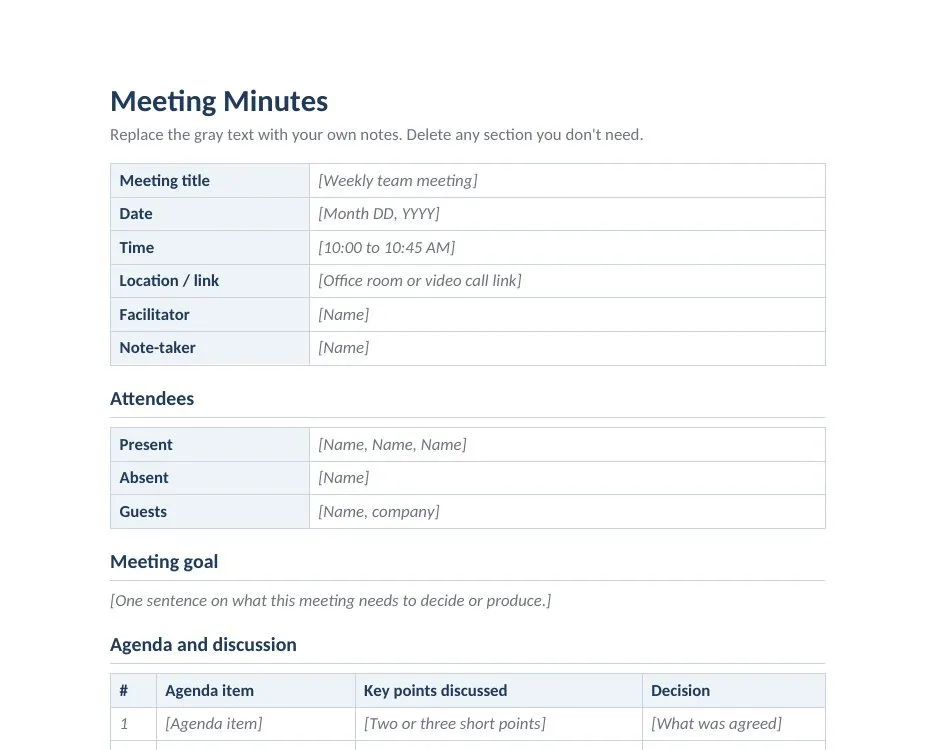
Meeting details (title, date, time, location or video link, facilitator, note-taker), attendees (present, absent, guests), meeting goal, an agenda table with key points and decisions, an action items table with owner, due date and status, a parking lot for open questions, and the next meeting date. Works well for project kickoffs and staff meetings too.
Download the team template (.docx)
Formal Meeting Minutes Template
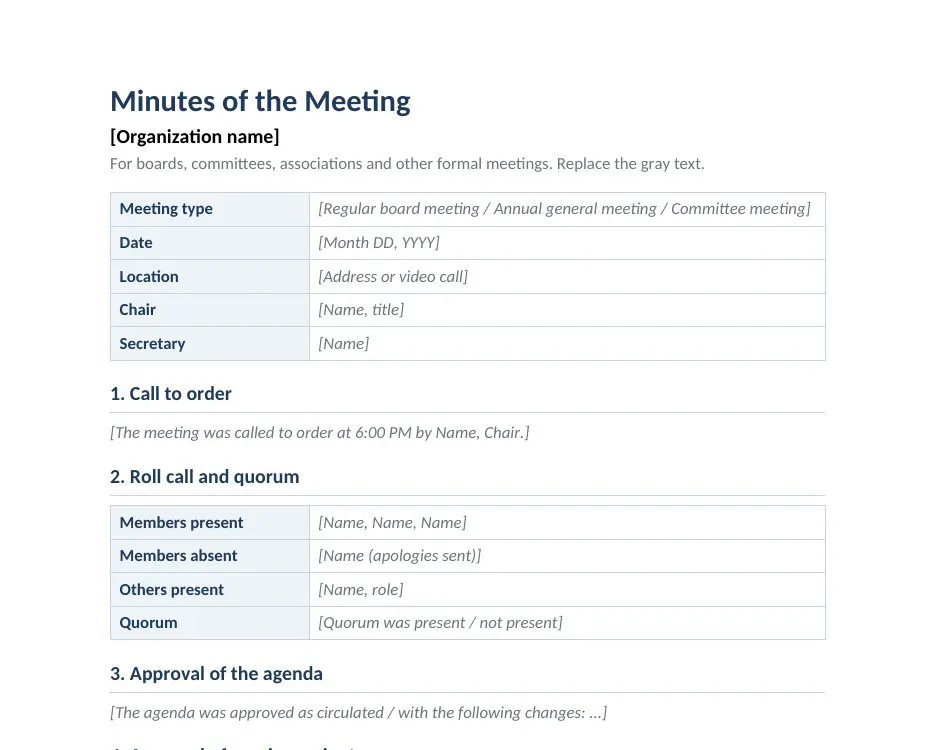
Organization name, meeting type, chair and secretary, then the standard order of business: call to order, roll call and quorum, approval of the agenda, approval of previous minutes, reports, old business, new business, a motions table (motion, moved by, seconded by, votes for, against and abstaining, result), action items, announcements, next meeting, adjournment, and signature lines for the secretary and chair. Suitable for nonprofit, HOA, PTA and committee meetings.
Download the formal template (.docx)
Simple One-Page Meeting Notes Template
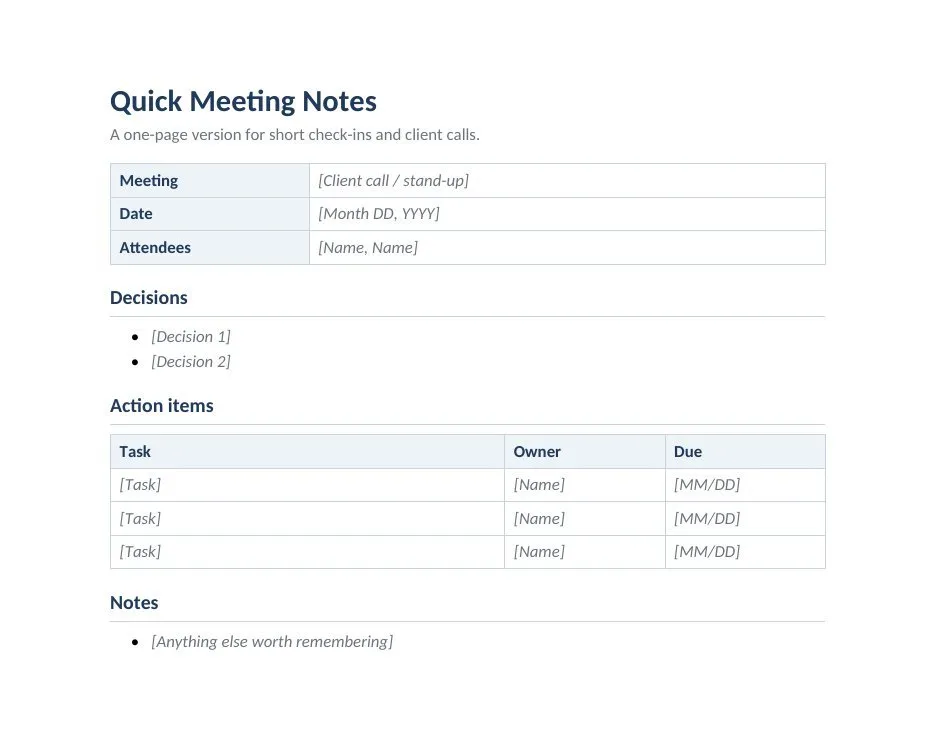
Meeting, date and attendees, then just decisions, action items and notes. It’s ideal for client calls and one-on-ones, when a full set of minutes would be overkill.
Download the one-page template (.docx)
Why the Templates Are Built This Way
A few design choices make these templates faster to fill in and easier to act on:
- A “Decision” column next to every agenda item. Readers skim minutes for outcomes, so decisions sit in their own column instead of getting lost in discussion notes.
- One owner per action item. A task shared by “the team” usually doesn’t get done. If two people are involved, name the one who’s accountable.
- A status column for action items. At the next meeting, you review last week’s tasks by updating one column.
- A parking lot. Off-topic questions get written down instead of taking over the meeting.
- “Action taken” instead of “summary” for board reports. Under Robert’s Rules, formal minutes record what was done, not a summary of what was said.
What to Include in Meeting Minutes
Meeting minutes are the official written record of a meeting’s attendees, decisions and action items. Good minutes include:
- Meeting name, type, date, time and location or video link
- Who chaired the meeting and who took the minutes
- Attendees present and absent, and whether a quorum was present (formal meetings)
- Approval of the previous meeting’s minutes
- Each agenda item, with a one-line summary of the discussion
- Every decision made, written exactly as agreed
- Motions, who moved and seconded them, and the vote result (formal meetings)
- Action items, each with one owner and a due date
- The time the meeting ended and the date of the next meeting
Example 1: Filled-In Team Meeting Minutes
Here’s what the team template looks like once it’s filled in. Notice how short each entry is: minutes record outcomes, not conversations.
- Meeting title: Weekly marketing meeting
- Date and time: November 2, 2026, 10:00 to 10:40 AM
- Location: Google Meet
- Facilitator: Sara Khan. Note-taker: Daniel Lee
- Present: Sara Khan, Daniel Lee, Priya Patel, Tom Reed. Absent: Ana Ruiz
- Meeting goal: Agree on the December newsletter and the holiday campaign budget.
Agenda and discussion
| # | Agenda item | Key points discussed | Decision |
|---|---|---|---|
| 1 | October results | Email open rate 38%, up from 31%; blog traffic flat | Keep current email schedule |
| 2 | December newsletter | Two topics proposed; year-in-review had more support | Lead with year-in-review |
| 3 | Holiday campaign | Budget options of $1,500 and $2,500 discussed | Approve $1,500, review results Dec 15 |
Action items
| Task | Owner | Due date | Status |
|---|---|---|---|
| Draft year-in-review newsletter | Priya Patel | Nov 14 | Not started |
| Set up holiday ads with $1,500 budget | Tom Reed | Nov 20 | Not started |
| Share October report with the founders | Sara Khan | Nov 5 | In progress |
Parking lot: Should we test a second newsletter each month? Revisit in January.
Next meeting: November 9, 2026, 10:00 AM
Example 2: Filled-In Board Meeting Minutes
Formal minutes use a fixed order and neutral, past-tense wording. This short example shows the parts people most often get wrong.
Riverside Community Association, Regular Board Meeting, November 2, 2026, Community Hall
- Call to order. The meeting was called to order at 6:02 PM by Maria Lopez, President. Secretary: James Carter.
- Roll call and quorum. Present: M. Lopez, J. Carter, A. Lee, J. Smith, R. Gupta. Absent: K. Brown (apologies sent). A quorum was present.
- Approval of minutes. The minutes of the October 5, 2026, meeting were approved as corrected; the date of the fall cleanup was changed from October 18 to October 19.
- Treasurer’s report. R. Gupta presented the treasurer’s report, which was received and filed.
- New business: 2027 budget. Motion by J. Smith, seconded by A. Lee, to approve the 2027 budget of $42,500 as presented. Motion carried 4–1–0.
- New business: playground repairs. Motion by A. Lee, seconded by R. Gupta, to spend up to $3,000 on playground repairs. After discussion, the motion was amended to set the limit at $2,500. Motion as amended carried unanimously.
- Adjournment. The meeting was adjourned at 7:14 PM.
Submitted by James Carter, Secretary. Approved December 7, 2026.
How to Record Motions, Votes and Approval
These are the rules most boards follow, based on Robert’s Rules of Order Newly Revised, 12th edition, which says minutes should record what was done at the meeting, not what was said (section 48:2).
Recording a motion
- Write the motion exactly as voted on, including any amendments.
- Record who made the motion. Robert’s Rules doesn’t require the seconder’s name, but many organizations include it.
- Record the result: carried, defeated, or postponed. For counted votes, add the numbers in a consistent order, such as for–against–abstain.
- Don’t summarize the debate. “After discussion” is enough.
Approving and correcting minutes
- The secretary drafts the minutes within a few days.
- The chair reviews the draft for accuracy.
- The draft is circulated to members before the next meeting, clearly marked “Draft.”
- At the next meeting, the chair asks for corrections. Corrections are made in the minutes themselves.
- The minutes are approved “as presented” or “as corrected,” and the approval is recorded in that meeting’s minutes.
- The secretary marks the minutes approved, signs them, saves a PDF, and files it with the organization’s records.
Other board terms you’ll meet
- Consent agenda: routine items, such as approving previous minutes, voted on together in one motion. Record which items it included.
- Executive session: a closed part of the meeting for confidential matters like personnel or legal issues. In the regular minutes, record only that the board went into executive session and any action taken publicly afterwards. Minutes of the executive session itself are usually kept separately and approved in executive session.
If your organization has bylaws, follow any rules they set for minutes; they override general guidance.
How to Write Meeting Minutes, Step by Step
Before the meeting
- Open a fresh copy of the template and fill in the title, date, time, location and facilitator.
- Copy the agenda into the agenda table, one item per row. The agenda becomes your outline.
- Add the invite list to the attendees section. During the meeting you only need to mark who’s absent.
During the meeting
- Record decisions word for word.
- Summarize discussion in a line or two. Write “Two budget options discussed; most preferred $1,500,” not who said what.
- Capture every action item with three things: the task, one owner and a due date.
- Park off-topic items in the parking lot.
After the meeting
- Clean up within 24 hours while everyone still remembers the details.
- Have the facilitator or chair review the draft, especially decisions and numbers.
- Share the minutes by email or in your team’s shared folder, with a consistent file name like
2026-11-02 Marketing meeting minutes.docx.
What Not to Put in Meeting Minutes
- A word-for-word transcript. Minutes should take a few minutes to read, not as long as the meeting itself.
- Opinions or personal comments. Record what was decided, not how the note-taker felt about it.
- Side conversations and jokes.
- Sensitive details that don’t need to be there, such as salaries or health information. Formal minutes become part of the organization’s official records, so keep them factual.
Formal Minutes vs Team Meeting Minutes
| Feature | Team meeting minutes | Formal minutes |
|---|---|---|
| Used by | Teams, projects, staff meetings | Boards, committees, nonprofits, HOAs, PTAs, AGMs |
| Structure | Agenda, decisions, action items | Fixed order of business |
| Motions and votes | Rarely recorded | Recorded with mover, result and often vote count |
| Quorum | Not needed | Recorded at the start |
| Approval | Usually just shared | Approved, signed and filed at the next meeting |
| Final format | Word or shared doc | Signed PDF in the organization’s records |
Use AI to Draft Your Minutes Faster
AI meeting assistants can now record a meeting, write a summary and pull out action items, which turns the note-taker’s job into checking instead of writing from scratch.
- Built into your video tool: Gemini’s “Take notes for me” in Google Meet, which since August 2026 also works for in-person meetings on Workspace Business Standard and higher; Zoom AI Companion on Zoom; and Copilot’s intelligent recap in Microsoft Teams, which usually needs a Microsoft 365 Copilot or Teams Premium license.
- Separate AI note takers such as Otter and Fireflies, which join calls on several platforms. Our Otter vs Fireflies comparison covers prices and accuracy.
- Copilot in Word: if your Microsoft 365 plan includes Copilot, open this template, paste your transcript or notes into the Copilot pane and ask it to fill in the agenda, decisions and action items tables.
A simple workflow that works with these templates:
- Let the AI tool record and summarize the meeting.
- Paste the summary into ChatGPT, Claude, Gemini or Copilot with a prompt like: “Turn these meeting notes into minutes with these sections: attendees, agenda items with one-line discussion summaries, decisions, and action items with one owner and a due date each. Don’t add anything that isn’t in the notes.”
- Copy the result into the Word template.
- Check every name, number, decision and due date. AI summaries commonly give a task to the wrong person, merge two decisions into one, or add a due date nobody agreed to.
Two cautions before you switch on recording:
- Get consent. Many places require everyone’s permission to record a call. Our guide to AI note taker consent rules by state explains the US rules.
- Think about confidentiality. Board, HR and client meetings often include sensitive information, and executive sessions usually shouldn’t be recorded at all. Read our guide on whether Otter is safe for confidential meetings first.
Tips for Using the Template in Word and Google Docs
- Make it your default: in Word, save the file as a Word Template (.dotx) via File > Save As, and it opens as a fresh, untitled copy every time.
- Add rows quickly: click in the last cell of a table and press Tab.
- Use it in Google Docs: upload the .docx to Google Drive, open it with Google Docs, then choose File > Save as Google Docs.
- Brand it: add your logo to the header, and change the heading color by right-clicking Heading 2 in the Styles gallery and choosing Modify.
- Share approved minutes as PDF: File > Save As > PDF keeps the official version from being edited.
- Track action items between meetings: copy them into a task tool so they don’t get lost. Our AI task management tools comparison can help you choose one. Teams already on Microsoft 365 can also keep running notes in OneNote or Loop.
Frequently Asked Questions
Is there a meeting minutes template in Word?
Yes. Word has built-in minutes templates, which come from Microsoft Create; in Word, go to File, then New, and search for “minutes.” You can also download the three free templates on this page, a team meeting template, a formal board template and a one-page version, which open directly in Word, Google Docs and LibreOffice.
Should meeting minutes include names?
Yes, in specific places. Record the names of people present and absent, who chaired and who took the minutes, who moved and seconded each motion, and who owns each action item. Don’t attribute every comment to a person; minutes record what was decided, not who said what.
Should I share meeting minutes as a Word file or a PDF?
Draft and correct minutes in Word so people can suggest changes. Once minutes are approved, save and share them as a PDF so the official version can’t be edited by accident. In Word, use File, then Save As, and choose PDF.
What is the difference between meeting minutes and meeting notes?
Meeting notes are informal and written for yourself or your team. Meeting minutes are the official record of a meeting, follow a set structure, and are often approved at the next meeting. Boards, committees, associations and many companies are expected to keep minutes.
Who is responsible for taking meeting minutes?
Usually a secretary, often called the recording secretary, or a named note-taker who is not running the meeting. In a small team, rotate the role each week. The chair or facilitator then reviews the minutes before they are shared.
Can AI write meeting minutes for me?
AI note takers such as Otter, Fireflies, Zoom AI Companion and Gemini in Google Meet can record a meeting and produce a summary and action items. They save time, but you should check names, numbers and decisions, and get consent from everyone before recording. For formal minutes, a person should always review and approve the final version.
Can I use this meeting minutes template in Google Docs?
Yes. Upload the Word file to Google Drive, open it with Google Docs, then choose File, then Save as Google Docs. The tables and headings carry over, and you can reuse the Google Docs copy for every meeting.
Get Started
Download the team meeting minutes template, fill in the header before your next meeting, and send the finished minutes within a day. If you run board or committee meetings, grab the formal minutes template too.