

Google Sheets Budget Tracker Template
A free Google Sheets budget tracker template to manage income, expenses, and savings. Simple, automatic totals, and easy to customise. Copy it now.
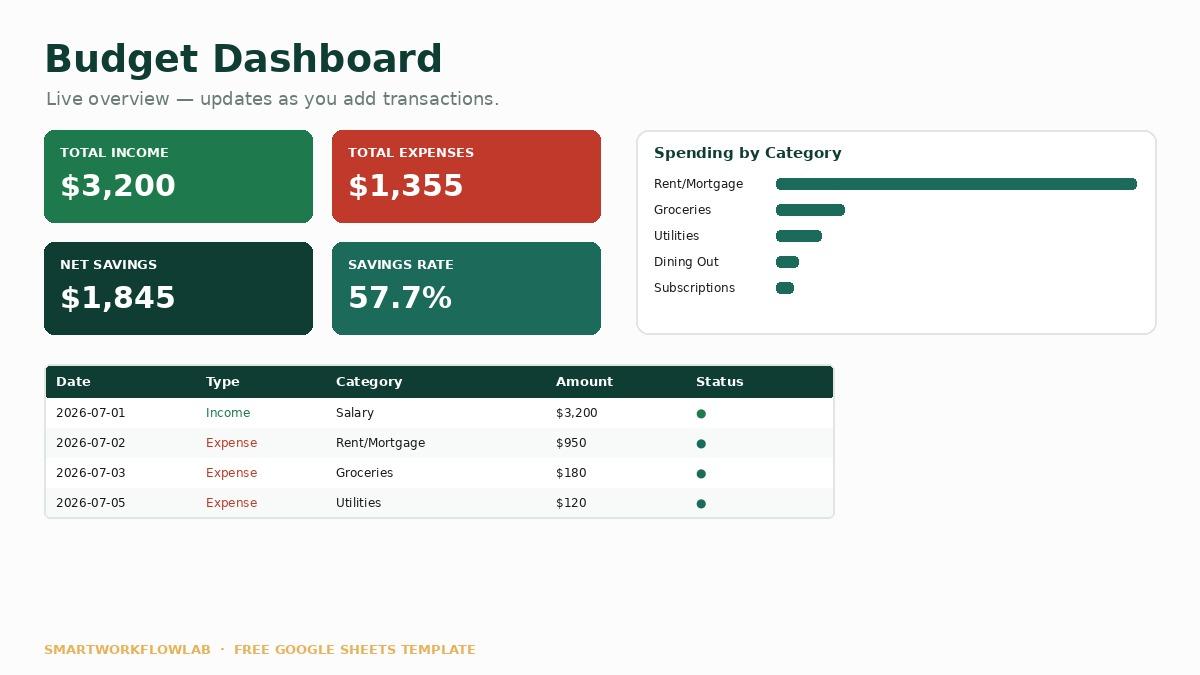
What's inside
- Monthly income and expense tracking
- Automatic category totals and balances
- A savings and goals section
- Simple charts that update as you type
- Clear, beginner-friendly layout
Keeping track of where your money goes is the first step to managing it better, and a simple, well-built spreadsheet is often all you need. This Google Sheets budget tracker gives you a clear picture of income, expenses, and savings without any complicated setup.
The formulas are already in place, so totals, balances, and charts update automatically as you type. You don’t need to know spreadsheet formulas to use it — just enter your numbers and the tracker does the maths.
Once you copy it, everything is editable — add your own categories, adjust the layout, and make it fit your situation.
Ready to use it?
Copy the Google Sheets template into your own workspace and start right away — it's free.
Frequently asked questions
How do I copy this Google Sheets template?
Open the template link and choose File then Make a Copy, and it saves into your own Google Drive. From there it's fully yours to edit, and your changes stay private to your account.
Is this budget tracker free?
Yes, the template is free to copy and use. All you need is a free Google account, and the whole tracker works within a standard Google Sheet.
Do I need to know spreadsheet formulas?
No. The totals, balances, and charts are already set up with formulas, so you just type in your income and expenses and the calculations happen automatically. You can dig into the formulas later if you want to customise it.
More templates
Last updated July 12, 2026