

You typed something into ChatGPT at 11pm. Maybe it was a rough draft of a resignation email, a symptom you were nervous about, or a chunk of code from a client project you weren’t supposed to share. You hit enter, got your answer, and closed the tab.
But where did that message actually go?
Most articles on what happens to data you share with AI tools answer with a shrug: “it depends,” “read the privacy policy,” “don’t share anything sensitive.” All true, all useless. This guide covers what actually happens mechanically, how ChatGPT vs. Claude vs. Gemini differ in practice, and where the real risk hides.
The Short Version
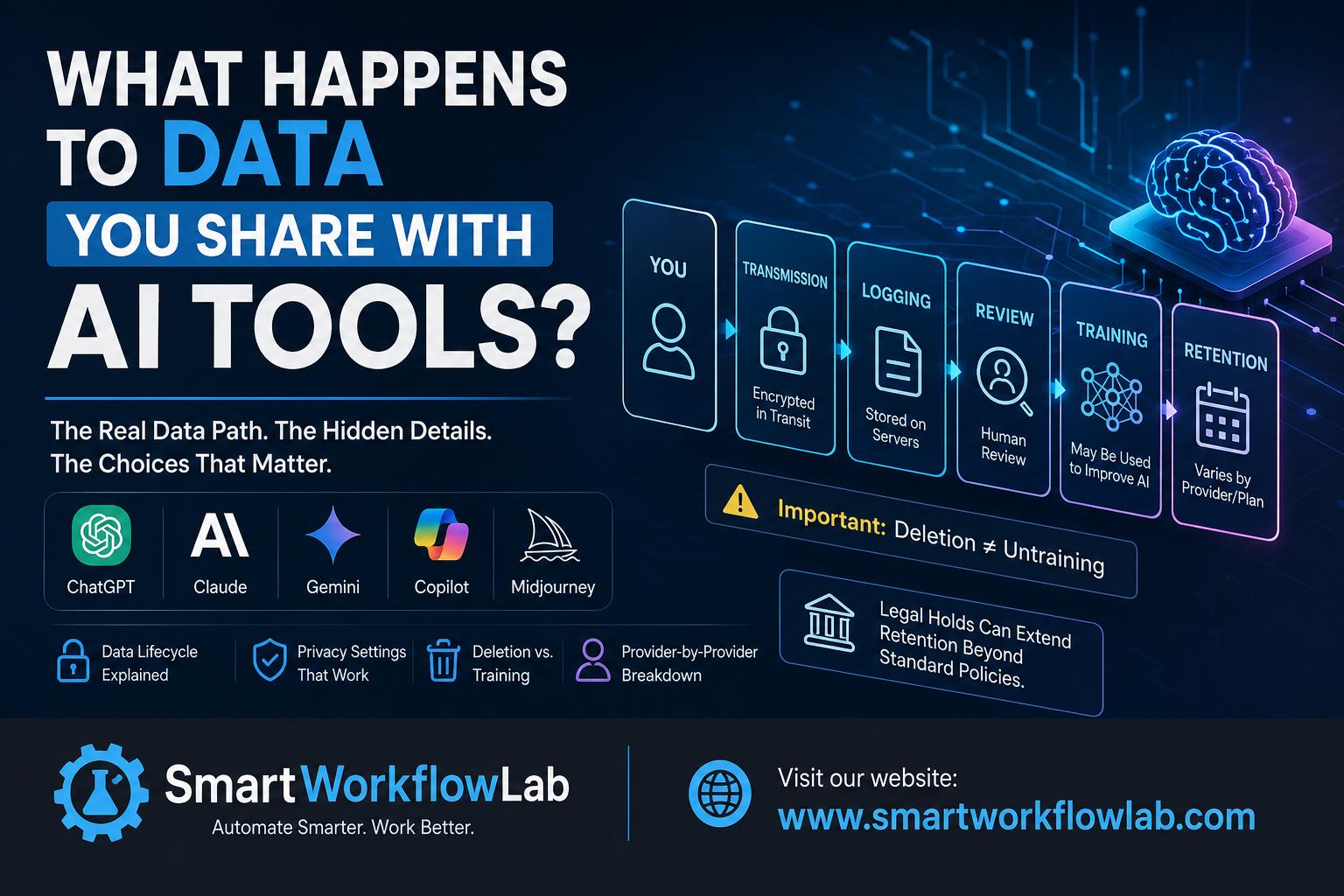
Here’s what happens to data you share with AI tools, mechanically: when you send a prompt, it’s encrypted and sent to the provider’s servers, where it’s processed to generate a response. That prompt and response are then logged — usually for a set retention window, sometimes indefinitely. Depending on the tool, your plan, and your settings, that logged conversation may also be reviewed by a human and used to train future versions of the model. Deleting the conversation from your screen doesn’t necessarily delete it from the provider’s backend, and if your data has already been used in a training run, there’s currently no reliable way to pull it back out.
That’s the whole story in one paragraph. Everything below is the detail that actually matters.
The Path Your Data Takes, Step by Step
It helps to separate this into distinct stages, because “AI stores your data” is really five different things happening in sequence, and they don’t all carry the same risk.
- Transmission. Your prompt travels from your device to the provider’s servers, encrypted in transit. This part is genuinely safe — nobody’s intercepting your ChatGPT messages on public wifi.
- Processing. The model reads your prompt and generates a reply. This happens in real time and doesn’t inherently require storage — but almost every consumer AI tool stores it anyway, for the next step.
- Logging. Your prompt and the AI’s response are saved to a server, tied to your account. This is separate from “training” — it’s just a record, similar to how your email provider keeps a copy of every message you send. How long this record sits there depends on the provider’s data retention policy, which varies enormously — more on that below.
- Human review. A portion of logged conversations — sometimes flagged automatically, sometimes randomly sampled — may be read by a human contractor or employee. This is usually framed as quality control or safety monitoring, but it means an actual person can, in some cases, read what you wrote.
- Training inclusion. If you haven’t opted out (or if the tool doesn’t offer an opt-out), your conversation may be used as training material to improve future versions of the model. This is the step that’s effectively permanent — more on that below.
Here’s the detail almost nobody mentions: retention policies have an asterisk. Providers can hold onto data longer than their stated policy if they’re under a legal hold — for example, ongoing litigation that requires them to preserve records as evidence. OpenAI has been in exactly this situation, retaining chat data beyond its normal deletion window because of a court order tied to an unrelated lawsuit. If you assumed “30-day retention” was a hard ceiling, it isn’t always.
Does AI Actually Forget Your Data?
This is the question everyone dances around. Here’s the mechanical answer.
There are three separate things people lump together as “my data”:
- Your visible chat history — what you see in the app. Deleting a conversation removes it from your view almost immediately.
- Server-side logs and backups — copies the provider keeps on their end, even after you hit delete. This is usually gone within 30 days, though as noted above, legal holds can extend that.
- Model weights from a training run — if your conversation was used to train the model, it’s now baked into millions of numerical parameters alongside billions of other examples. It isn’t stored as “your message” anywhere you or the provider can point to and delete.
That third category is the one with no clean undo button. Researchers have shown that large language models can sometimes reproduce fragments of their training data — a phenomenon called memorization — when prompted in specific, unusual ways. It’s not common, and providers actively work to reduce it, but it demonstrates that training data doesn’t just vanish into an abstract average. It can leave traces.
So when a provider says “we don’t train on Enterprise data” but “consumer data may be used unless you opt out,” that AI training data opt-out matters far more than it sounds like it does. Opting out before you send something sensitive is meaningfully different from opting out afterward — your past conversations may have already been swept into a training run before you flipped the switch.
It’s Not Just What You Type
Every “don’t share this with AI” list focuses on the words you type. That’s only part of the picture now.
Uploaded files. When you drop a PDF, spreadsheet, or screenshot into an AI chat, the tool doesn’t just read the part you asked about — it typically processes the entire document, including metadata like author names, timestamps, and file history that you never consciously “shared.”
Voice and images. Multimodal tools that accept photos or voice input are collecting a different, richer category of data — a voice recording carries far more identifying information than typed text (accent, background noise, other people’s voices caught in the room).
Account and behavioral metadata. Your IP address, device type, session timing, and usage patterns are collected by virtually every AI tool, separate from the content of your prompts. This is the same kind of data any website collects, but it’s easy to forget it’s happening alongside the “conversation” you think you’re having.
Agentic access. This is the newest and least understood category. AI tools that can browse your open tabs, read your files, or act inside your email and calendar aren’t limited to what you type — they can see whatever they’re given permission to access. If you’ve granted an AI assistant browser or file access, the effective scope of “data you’re sharing” is your entire open tab, not just your prompt box.
How the Major AI Tools Actually Handle It Right Now
AI data privacy policies shift often enough that a comparison table has a shelf life — but as of mid-2026, this is where things stand.
ChatGPT (OpenAI). On Free, Plus, and Pro (consumer) accounts, your conversations are used by default to train and improve OpenAI’s models, unless you turn off “Improve the model for everyone” in Settings → Data Controls. Turning that off stops future conversations from being used for training, but it doesn’t erase your data immediately — OpenAI can still retain messages for roughly 30 days for safety monitoring and abuse prevention even with opt-out enabled, longer under legal obligations. Enterprise, Team, and API accounts have contractual agreements that prohibit training use by default.
Claude (Anthropic). This one changed significantly in the past year. Since an August 2025 policy update, Free, Pro, and Max users must actively choose whether Anthropic can use their conversations to improve Claude — it’s not silently on by default, but it’s not silently off either; you’re forced to pick. Opting in extends data retention to five years; declining keeps the existing 30-day retention window. Worth knowing: a June 2026 policy update clarified that conversations flagged by Anthropic’s safety systems can still be used for training regardless of your opt-out choice, though the company hasn’t published what triggers that flag. As with the others, Team, Enterprise, API, and cloud-platform access (Bedrock, Vertex) operate under separate commercial terms with stronger protections.
Gemini (Google). Consumer Gemini conversations are tied to your Google Account, and unlike the chat-window toggles in ChatGPT and Claude, the control lives inside your broader Google account settings under “Gemini Apps Activity.” Default retention for consumer accounts is 18 months, adjustable to 3 or 36 months. Turning Gemini Apps Activity off stops future conversations from being used for training or human review. On the developer side, Google’s paid Gemini API and Vertex AI terms state that prompts and responses aren’t used to improve or train Google’s products, while the free API tier and free AI Studio access do use submitted content for that purpose — a split that catches a lot of people building small projects off the free tier.
Copilot, Perplexity, and others. Microsoft Copilot’s data handling depends heavily on whether it’s the consumer version or the version bundled into a Microsoft 365 Enterprise license — the enterprise version generally carries the same kind of contractual protection as the other providers’ enterprise tiers. Perplexity’s consumer tier, like the others, uses queries to improve its product unless you opt out in settings.
The tools with no real answer. Not every AI tool publishes this level of detail. Some — particularly newer or foreign-operated chatbots — offer no clear opt-out, no published retention window, and no enterprise agreement option. If a tool can’t tell you what happens to your data, the safest assumption is that everything you send it is retained indefinitely and used however the company sees fit.
The one-line takeaway across all of them: paying for a subscription does not automatically mean privacy. “Plus,” “Pro,” and “Premium” are feature tiers, not data-protection tiers. The protection that actually changes your risk is a Team, Enterprise, or business API plan with a signed data agreement — or, on the tools that offer it, manually flipping the training toggle off.
The Variable Nobody’s Covering Yet: AI Memory
The newer thing changing this whole picture is memory — AI tools that remember details across separate conversations, not just within one chat.
This is a meaningfully different privacy situation than standard logging. A stored chat log sits passively until (and unless) it’s used in a training run. A memory feature actively pulls details from past conversations into new, unrelated ones — mention your job once, and it might surface again three weeks later when you’re asking about something completely different. Google’s rollout of cross-app memory (branded “Personal Intelligence” in 2026) connects Gemini to your Gmail, Drive, and Maps history by default in the US, requiring an opt-out rather than an opt-in — the opposite of how it launched in Europe, where GDPR required explicit consent first.
Practically: if you use a tool with memory turned on, assume anything you’ve told it is available as context to every future conversation, not filed away in a single thread. Most tools let you view and delete individual memory entries — it’s worth actually checking what’s accumulated there at least once.
Real Incidents Worth Knowing About
Abstract risk is easy to ignore. A few concrete ones aren’t:
- In 2023, engineers at Samsung pasted confidential source code into ChatGPT to get help debugging it. The code left the company’s control the moment it was submitted, and Samsung subsequently restricted employee AI use — one of the earliest, most-cited examples of accidental corporate data exposure through AI.
- OpenAI has faced court orders requiring it to preserve ChatGPT conversation data beyond its standard retention window, as part of unrelated litigation discovery — a real-world example of the “legal hold” exception overriding a stated deletion policy.
- Google’s 2026 rollout of cross-app AI memory drew scrutiny after reports that Gemini’s access to Gmail and other services was enabled with limited upfront notice for US users, prompting confusion about what the assistant could actually see.
None of these required a hack or a breach. In each case, the data went exactly where the terms of service said it could go — the surprise was that most users never read that far.
What You Should Genuinely Never Enter
Keep this part short, because you already know most of it. Group it by what’s actually at stake:
- Identity risk: Social Security or national ID numbers, passport numbers, full birthdates paired with your name.
- Financial risk: Bank account or card numbers, login credentials, passwords.
- Health risk: Diagnoses, medication details, anything you wouldn’t want tied to your identity in a data breach.
- Professional/legal risk: Client contracts, unreleased product details, source code you don’t personally own, anything covered by attorney-client privilege or an NDA. Submitting regulated data to a consumer AI tool can amount to a compliance violation regardless of intent.
- Someone else’s data: A coworker’s performance review, a customer’s personal details, a friend’s private situation — you can’t consent on someone else’s behalf.
The personal categories put you at risk of identity theft or embarrassment. The professional ones can trigger an actual compliance violation for your employer, regardless of your intent.
A Simple Framework Instead of a Long List
Rather than trying to memorize a list of banned topics, run new situations through three questions:
- Is this regulated or identifiable — mine or someone else’s? If yes, it needs an enterprise-grade tool or it shouldn’t go in at all.
- Is training or memory turned on for this account, and can I turn it off? If you haven’t checked, assume it’s on.
- Am I on a free/consumer plan, or one with an actual data agreement? A consumer subscription is not the same thing as a business contract, even at the same price point.
If the answer to #1 is “yes” and the answer to #3 is “consumer plan,” that’s your signal to stop and either redact the sensitive part, use a temporary/incognito chat mode if the tool offers one, or switch to a properly licensed business tool.
Reducing Your Exposure: The Settings That Actually Matter
- Turn off model training in whichever settings menu your tool uses — Data Controls (ChatGPT), Privacy Settings (Claude), or Gemini Apps Activity (Google Account). Do this once per account, not per device.
- Use temporary or incognito chat modes where available — these typically skip both training and memory for that specific conversation.
- Check what’s in “memory,” not just chat history. These are increasingly separate settings, and clearing your chat history doesn’t always clear memory.
- Redact before you paste, not after. Swap real names, account numbers, and company identifiers for placeholders when you’re just after help with structure or wording — a password manager or encrypted notes tool makes this easier since you’re never typing the real value in the first place.
- Keep personal and work AI accounts separate. A personal ChatGPT subscription reimbursed by your employer is still governed by consumer terms, not a business agreement — the badge on the invoice doesn’t change the privacy policy underneath it.
- Check upload-specific settings. Some tools handle documents differently from typed prompts — it’s worth confirming rather than assuming they’re covered by the same toggle.
How [Your Site Name] Helps
[Your Site Name] tracks AI provider privacy policies as they change and translates them into plain-language guidance — so you’re not left re-reading a legal terms page every time a company quietly updates its data retention window. If you’re setting AI usage policy for a team rather than just yourself, our AI usage policy template covers the same decision framework in this guide in a format you can hand directly to employees.
For businesses navigating regulated data specifically, this usually connects to a broader data privacy and compliance strategy rather than a single tool decision.
Frequently Asked Questions
1. Does AI train on my data even if I never type anything sensitive?
Yes, if training is enabled on your account — it doesn’t distinguish between sensitive and mundane prompts. The toggle is account-wide, not content-aware.
2. Can I get my data removed from an AI model after it’s been used for training?
Not in any reliable, verifiable way once a training run has happened. You can stop future data from being included, and delete what’s sitting in your account or logs, but “un-training” a completed model isn’t something providers currently offer or, in most cases, can technically guarantee.
3. Is it safe to use AI for work tasks?
For general, non-sensitive tasks, generally yes on a properly configured account. For anything involving client data, health information, or proprietary business content, only on a business/enterprise plan with a signed data agreement — not a personal subscription, even a paid one.
4. Do free AI tools use more of your data than paid ones?
Usually yes, but not always by much. The bigger gap is between consumer plans (free or paid) and business/enterprise plans, not between free and paid consumer tiers.
5. Does turning off chat history stop training use?
Not necessarily — on several platforms, training and history are separate settings. Check both.
6. Is voice or image data treated differently from text?
Often yes, and usually with less transparency. Voice and image data can carry more identifying detail than text, so it’s worth checking a tool’s specific policy for multimodal input rather than assuming it matches the text policy.
Final Thoughts
Understanding what happens to data you share with AI tools doesn’t mean avoiding AI altogether — it means treating these tools the way you’d treat any other third party that’s suddenly handling a lot of your information: worth using, worth understanding, and worth checking in on every so often as the settings and policies keep shifting under you.
Start with the one setting you’ve probably never checked: open your AI tool’s privacy or data controls right now and see whether training and memory are on. That two-minute check tells you more about your actual exposure than any list of dos and don’ts.
Want help setting AI policy for your whole team, not just your own account? [Your Site Name] can walk you through a practical AI usage policy — what to allow, what to restrict, and which plans actually protect your data. Contact us for a free consultation, or explore our AI usage policy template to get started on your own.