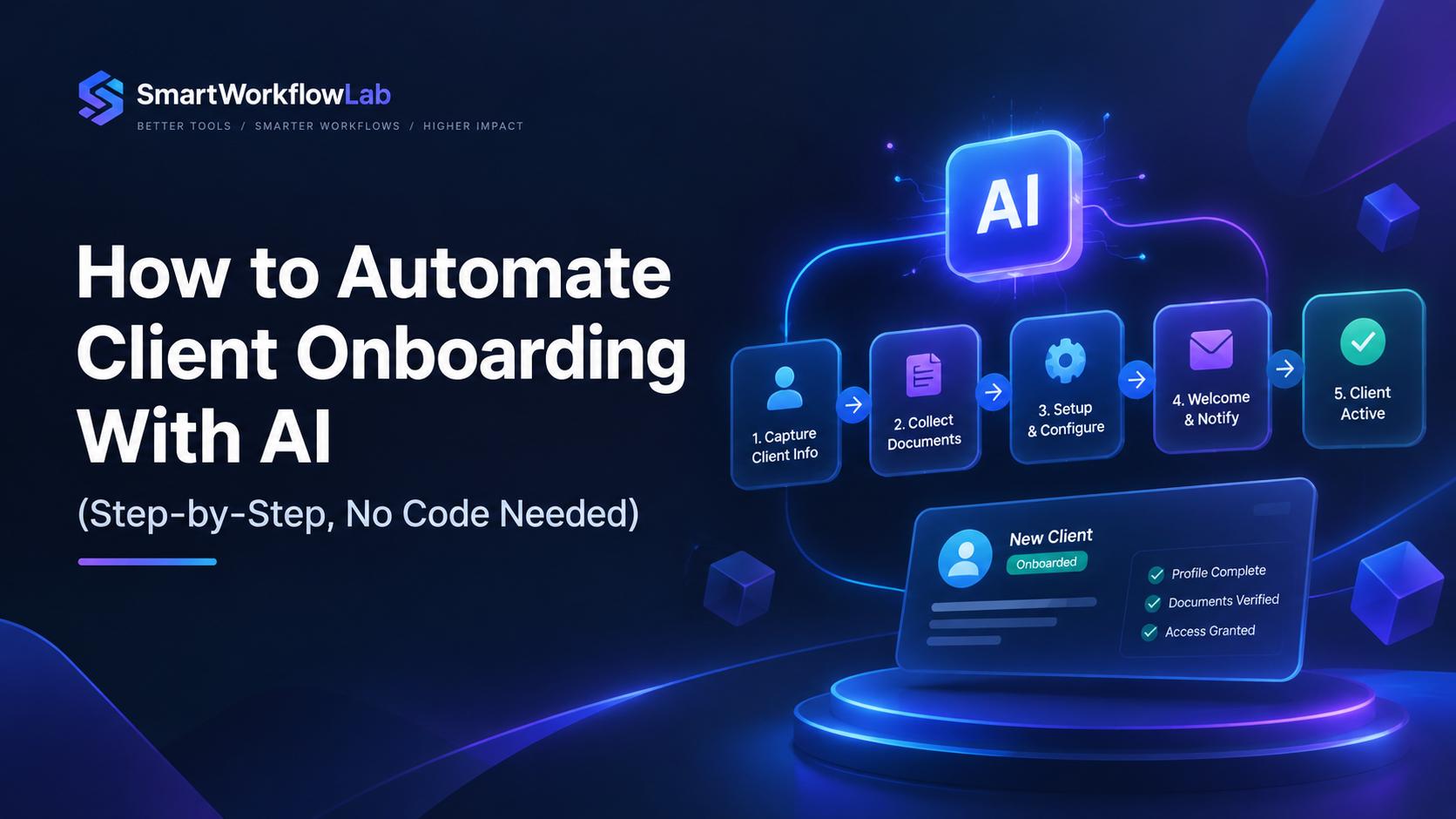
You just signed a new client. Within 24 hours you need to send a welcome email, collect tax documents, generate a contract, schedule a kickoff call, set up their project board, and follow up on everything they haven’t done yet. That’s 5–11 hours of admin per client, and it’s the reason your best people spend their weeks chasing PDFs instead of doing the work clients actually hired them for.
This guide shows you how to automate client onboarding with AI using tools you can set up this week — without writing code, without a six-month implementation timeline, and without making your onboarding feel like it was assembled by a chatbot.
What Does It Mean to Automate Client Onboarding With AI?
Automating client onboarding with AI means using intelligent tools — like ChatGPT, Claude, or AI agents on platforms such as Zapier and Make — to handle repetitive coordination: collecting intake data, generating documents, scheduling meetings, and flagging at-risk accounts. Unlike rule-based automation, AI adapts to each client’s context, cutting onboarding time by up to 60%.
Key takeaways:
- AI reduces onboarding time by up to 60% and errors to under 5% using no-code tools
- The 7-step process starts with auditing your current workflow, not picking tools
- Tool stacks start at $20/month; most businesses see payback in 4–6 weeks
- Keep human touchpoints for kickoff calls, scope changes, and escalations
Most “AI onboarding” content conflates basic automation (send an email when a form is submitted) with actual AI (read an uploaded document, extract relevant fields, draft a personalized response). They’re different, and the distinction shapes how you build your system.
Why Manual Onboarding Is Costing You Clients — Not Just Time
The Time Tax Nobody Budgets For
Most service businesses spend 5–11 hours onboarding a single client. I’ve timed it across a dozen agencies and consultancies, and the breakdown is consistent: 30–90 minutes collecting intake information, another 30–60 minutes chasing documents, 15–30 minutes setting up project boards, and the rest lost to scheduling and follow-ups.
Multiply that by 15 new clients a month, and you’ve buried an entire full-time employee’s worth of hours in admin.
The bottlenecks cluster in four places: intake collection, document gathering, kickoff scheduling, and first-week follow-ups. Each one is solvable. Each one, left manual, quietly erodes the client’s first impression before your team has had a real conversation.
The Churn You Don’t See Coming
Here’s what makes this more than an efficiency problem: over 20% of voluntary churn traces back to a rough first 90 days. The client doesn’t leave because your work is bad. They leave because they spent two weeks waiting for a kickoff call while reminder emails piled up from an overwhelmed coordinator.
Research consistently shows that 90% of people will abandon an onboarding process that feels too complex. That’s a revenue problem — you already paid to acquire that client, and you’re losing them before they see any value.
Companies that automate their onboarding workflows see early churn drop by roughly 25%. Forrester found that every dollar invested in onboarding returns five. The gap between that return and what most businesses get comes down to one thing: the process is still manual.
The Inconsistency Problem
Manual processes vary by who runs them and current client load. One client gets a polished welcome email within an hour. The next waits three days and gets a two-sentence message with a broken Calendly link.
There’s no audit trail, which creates compliance risk for anyone dealing with KYC, AML, GDPR, or SOC 2 requirements. And scaling means hiring more coordinators rather than building a system that handles volume without adding headcount.
AI vs. Regular Automation — What’s Actually Different
This distinction trips up almost every guide on this topic, so let me be direct: Zapier is not AI. Make is not AI. They are automation platforms that can connect to AI, and that difference matters for how you think about what to build.
Rule-Based Automation
Zapier, Make, and similar platforms follow “if this, then that” logic. Contract signed? Send email. Form submitted? Create a record. Payment received? Trigger the welcome sequence.
This is predictable, reliable, and entirely rigid. It breaks the moment something deviates from the expected input — a client uploads a JPEG instead of a PDF, sends documents in a zip file, or replies to a welcome email with a question the automation wasn’t designed to handle.
What AI Actually Adds
AI-powered onboarding handles the parts that rule-based automation can’t:
Document intelligence. Using NLP and OCR, AI reads unstructured documents — contracts, IDs, tax forms, bank statements — and extracts structured data. A client uploads their business registration, and AI pulls the company name, registration number, and address without anyone typing a thing — with 95%+ accuracy on standard documents.
Personalization that sounds human. Instead of the same template for every client, AI generates messages referencing their specific project type, industry, and goals. The difference between “Welcome aboard!” and “Welcome — based on your intake form, your main priority is reducing manual billing by Q2, so we’ve structured your onboarding to get that live first” is the difference between feeling like a ticket number and feeling like a priority.
Agentic workflows. AI agents don’t just follow instructions — they make decisions within defined boundaries. A client hasn’t logged in after three days? The agent drafts and sends a check-in. A submitted document is missing page 2? The agent flags it and sends a targeted follow-up, not a generic reminder. Gartner predicts 40% of enterprise apps will include task-specific AI agents by the end of 2026, up from less than 5% in 2025.
Function calling and MCP. Through function calling and the Model Context Protocol (MCP), AI models can now trigger actions directly in external tools — create a HubSpot contact, send a Slack notification, schedule a Calendly meeting — without needing a separate automation layer to broker the connection. This collapses what used to be a five-step Zap into a single AI call.
The Practical Difference
| Capability | Rule-Based Automation | AI-Powered Automation |
|---|---|---|
| Welcome email | Same template every time | Personalized to client’s industry, project type, and stated goals |
| Document collection | Sends reminders on a timer | Reads submitted docs, flags what’s missing, asks targeted follow-ups |
| Intake forms | Static fields, same for every client | Dynamic forms that adapt questions based on previous answers |
| Issue detection | Manual review by coordinator | AI flags disengaged clients and predicts churn risk automatically |
| Scaling | Requires new rules for each edge case | Handles novel scenarios without manual reprogramming |
The honest take: you need both. AI without automation infrastructure has no way to trigger actions. Automation without AI can’t handle variability. The winning stack is an automation platform (Zapier, Make, or n8n) with AI plugged in at the points where intelligence matters.
How to Automate Client Onboarding With AI (Step by Step)
Step 1: Audit Your Current Process Before You Automate Anything
This is the step everyone skips, and it’s why most implementations feel bolted-on.
Before you touch a tool, map every touchpoint from signed contract to first value delivery. Time each one — not what your SOP says, but what it actually takes when three clients are onboarding simultaneously and your coordinator is juggling support tickets.
I recommend scoring your current process using the 5 C’s of onboarding as an audit framework:
- Compliance: How do you handle contracts, NDAs, data protection agreements, and industry-specific requirements? Is there an audit trail?
- Clarification: How do clients learn what they’ve purchased, what to expect, and what success looks like?
- Culture: How do clients experience your brand’s personality and values during onboarding?
- Connection: How do you introduce clients to their key contacts on your team?
- Check-back: How and when do you gather feedback during the process?
Rate each C on a 1–5 scale for current quality and automation potential. Compliance and Clarification are almost always the highest-automation categories. Connection and Culture are where human touchpoints matter most. This gives you a ranked priority list — not a vague “automate everything” mandate.
A mistake I often see: teams automate their most visible pain point first (usually document chasing) without realizing that their intake form is the actual bottleneck. Twenty minutes of mapping saves weeks of rebuilding.
Step 2: Choose Your Tool Stack Based on Volume, Not Hype
Every guide recommends tools. Most don’t tell you which ones make sense at which scale. Here’s what actually works:
| Monthly Client Volume | Recommended Stack | Monthly Cost | Technical Skill |
|---|---|---|---|
| 1–10 clients | Zapier + ChatGPT + Google Docs + Calendly | $20–50 | None (no-code) |
| 10–30 clients | Make + Claude API + Notion or Airtable + PandaDoc | $50–150 | Low (visual builder) |
| 30–100 clients | n8n (self-hosted) + GPT-4/Claude API + HubSpot or ClickUp | $100–400 | Medium |
| 100+ clients | Moxo, Rocketlane, or GuideCX (dedicated platform) | $500+ | Varies |
Here’s what I’ve found using each one:
Zapier is the fastest starting point. It connects to 7,000+ apps, and the ChatGPT integration is solid for simple tasks. The downside is task-based pricing — at $19.99/month for 750 tasks, a 50-trigger-per-day workflow burns through your allocation in 15 days. Calculate your actual task volume before committing.
Make (formerly Integromat) is better for anything with branching logic — if Client Type A, do X; if Client Type B, do Y. Its visual builder makes complex workflows easier to debug, and at $9/month for 10,000 operations, it’s usually cheaper than Zapier at volume.
n8n is the right choice if you have compliance requirements that block third-party data processing. It’s open-source and self-hostable, so client data never leaves your infrastructure. For HIPAA-regulated or SOC 2-certified businesses, this is often the only option that passes security review. The tradeoff is that you need someone comfortable with self-hosting and basic configuration.
For AI models specifically: ChatGPT (GPT-4) and Claude both work well for generating onboarding content. Claude handles long documents better — if you’re feeding in 30-page client briefs for summarization, Claude’s larger context window is a meaningful advantage. Both APIs have dropped below $0.01 per 1,000 tokens as of 2026, which means the AI layer costs almost nothing at small-to-medium scale.
Dedicated platforms like Rocketlane, GuideCX, and Moxo make sense when your monthly volume justifies the price. Moxo’s approach is distinctive — AI agents handle coordination while named humans stay accountable for decisions, which is architecturally different from just adding a chatbot to a project management tool. Rocketlane (starting at $19/user/month) is strong for professional services firms that want built-in time tracking and resource management alongside onboarding.
Step 3: Build Your Welcome and Intake Sequence
This is where automation and AI intersect for the first time. The trigger is simple: contract signed in your CRM, payment received in Stripe, or e-signature completed → the sequence fires.
The welcome email. Use AI to personalize, not generate from scratch. Write your ideal welcome email manually — the tone, the structure, the personality — then use ChatGPT or Claude to personalize it per client: “Based on your form, it looks like your main goal is reducing manual invoicing by Q2 — we’ve prioritized that in your onboarding schedule.”
The prompt engineering tip most guides miss: the quality of AI-generated onboarding content depends entirely on your templates. If your base welcome email is generic, AI will produce a personalized version of something generic. Write the bones yourself. Let AI handle the customization layer.
The intake form. A Typeform or Notion form auto-sends with the welcome. If the form isn’t completed within 48 hours, a follow-up fires — and this is where AI earns its keep. Instead of a robotic “Reminder: please complete your form,” AI drafts a warmer nudge that references what you’re waiting on and why it matters for their specific project.
CRM sync. Zapier or Make automatically creates a client record in HubSpot, Airtable, or Notion the moment the form is submitted. No manual data entry. No copy-paste. One submission populates every system.
Step 4: Automate Document Collection and Verification
Document chasing is the most hated part of onboarding for both teams and clients. It’s also where AI creates the most dramatic improvement.
AI-powered document intelligence reads uploaded files and extracts structured data. A client submits their business registration, and AI pulls the key fields without anyone manually reviewing the document.
For regulated industries, this is transformational. KYC and AML verification that used to take a compliance officer 30–60 minutes per client can be reduced to a 60–90 second human review of what the AI flagged. A human confirms or overrides.
A practical limitation: OCR accuracy drops on handwritten documents, poor scans, and non-standard formats. Build a confidence threshold — high-confidence extractions (clean PDFs, typed forms) process automatically, low-confidence ones route to a human. In testing, roughly 80% of standard business documents need no human intervention.
Step 5: Auto-Generate Contracts and Proposals
Train your AI with your service templates and pricing structure. The prompt pattern that works best:
“Generate a custom proposal for a [project type] based on these service tiers: [list]. Include a project overview, deliverables, timeline, and next steps. Use the following tone and formatting: [paste your style guide].”
Connect the output to DocuSign or PandaDoc — client details auto-populate from your CRM, and the document goes out for signature untouched. When signed, a webhook triggers the next step.
One warning: never let AI generate pricing or contractual terms without human review. AI can hallucinate numbers, invent terms, or misapply pricing tiers. The proposal draft should always pass through a human before reaching the client — this is a “review and send” step, not a “fully automated” one.
Step 6: Schedule the Kickoff Automatically
After intake completion or contract signing, a Calendly or Cal.com link goes out automatically. No coordinator involved.
Here’s where AI adds a layer that pure automation can’t: pre-call preparation. AI reads the client’s intake form, extracts key details, and generates a structured brief for your team — client background, project scope, stated priorities, potential concerns, and suggested talking points. Your team walks into the kickoff call already informed instead of scanning the intake form five minutes before.
Post-call, AI generates a recap from the meeting notes or transcript: action items, responsibilities, deadlines, and next steps, formatted and sent to the client within an hour.
What NOT to automate here: the kickoff call itself. The agenda can be templated. The recap can be AI-drafted. The 45 minutes of actual conversation should be entirely human. This is where you build the trust that keeps clients for years.
Step 7: Set Up First-Week Follow-Ups and Proactive Check-Ins
The first week after kickoff is where most onboarding processes go silent — and where churn risk spikes.
Set up an automated check-in sequence: Day 1 (post-kickoff recap and first action items), Day 3 (progress check and resource links), Day 7 (milestone review and feedback request). AI monitors engagement throughout: a client who hasn’t logged into their portal after three days gets a personalized outreach.
Gartner research shows AI churn prediction models identify at-risk clients with 80–90% accuracy. The key is acting on those signals early. Problems get solved before clients start drafting the “we’ve decided to go in a different direction” email.
What You Should Never Automate
Three onboarding moments should stay manual, even when they could be automated:
The kickoff call. Template the agenda. AI-draft the recap. But the conversation itself is where trust gets built. A client paying $5,000/month for your services does not want to talk to a bot.
Mid-project scope changes. AI can flag when scope is drifting — tracking hours against estimates, noting when deliverables are added without budget adjustments. But the conversation about what changes and what it costs? That’s between humans.
Escalations and complaints. The moment a client expresses frustration, an automated reply makes it worse. An AI-generated “We understand your concern” when a client is upset about a missed deadline communicates that nobody’s paying attention. A human handles every escalation.
The principle: AI handles coordination, humans handle relationships. The goal isn’t removing yourself from the process — it’s making the human moments more prepared and more impressive.
Industry-Specific Playbooks
Generic advice only gets you so far. Here’s what actually changes by business type:
Agencies and Consultancies
The key bottleneck is scope definition and deliverables documentation. AI auto-generates statements of work from intake data, and project boards in ClickUp or Notion get created automatically with milestones pulled from the proposal. Typical setup: 2–3 days for automation, plus 1–2 days for prompt tuning. Budget for 3–5 prompt iterations — AI’s first draft is usually about 70% there.
Accounting and Financial Services
Document collection is the bottleneck. Clients submit tax forms, bank statements, and incorporation documents in every format imaginable. AI document intelligence handles extraction at scale, but compliance is non-negotiable — KYC/AML verification requires audit trails, and every extraction needs to be logged. Self-hosted n8n is often the only stack that passes SOC 2 security review for firms in this space.
SaaS Companies
The onboarding challenge isn’t administrative — it’s activation. Time-to-value is everything. AI-powered in-app onboarding (contextual tooltips, personalized product tours, proactive help based on user behavior) reduces time-to-first-value measurably. Churn prediction models watching the first 30 days of usage patterns can flag accounts that need intervention before they go silent.
Legal and Professional Services
Conflict checks, engagement letters, and retainer agreements dominate the onboarding timeline. AI reads engagement terms and compares them against firm standards, flagging deviations. Client portals with secure document exchange and full audit logging handle the GDPR and data protection requirements that make email-based onboarding a compliance liability.
When AI Onboarding Goes Wrong — Failure Modes Nobody Talks About
Every guide makes it sound like you plug in AI and everything works. That hasn’t been my experience. Here’s what actually breaks:
The “Robotic Welcome” Problem
What happens: You let AI write the welcome email from a minimal prompt, and it reads like it was generated by a machine — because it was. Generic language, no personality, obvious template structure.
The fix: Write every onboarding email yourself first. Craft it the way you’d write it if you had unlimited time. Then use AI to personalize that template per client. The bones come from you. AI handles the customization, not the voice.
The “Hallucinated Details” Problem
What happens: AI invents contract terms, inserts pricing that doesn’t exist in your rate card, or references details the client never mentioned. This has happened in every implementation that skipped human review.
The fix: Never send AI-generated content to a client without a human seeing it first. For documents with legal or financial implications (proposals, contracts, SOWs), this is not optional. Use structured data inputs — pull pricing from a database, not from AI’s memory.
The “Silent Client” Problem
What happens: Your automated reminders go to spam, or the client ignores them because they feel like every other marketing email in their inbox.
The fix: Build an escalation trigger. If no response after two automated nudges, a human calls. AI flags the stall. A person resolves it. The automation can tell you something is wrong. Only a human can figure out why.
The “Over-Automated” Problem
What happens: You automate the strategy discussion or the scope-definition conversation because it was technically possible. The client feels like they’re interacting with a system, not a team.
The fix: Go back to the 5 C’s audit. Connection and Culture need human touchpoints. Compliance and Clarification can be automated. If a step exists to build trust, keep a person in it.
Measuring ROI — The KPIs That Actually Matter
After you automate client onboarding with AI, track five metrics:
| KPI | What It Measures | Target Benchmark |
|---|---|---|
| Onboarding completion rate | % of clients completing all required steps within target window | Below 70% = broken process. Above 85% = strong. |
| Time-to-value | Days from contract signing to first delivered value | Aim for 40–60% reduction from your current baseline |
| 90-day retention rate | % of clients still active at 90 days, tracked by pre/post cohort | 15–30% improvement is typical with automation |
| Support tickets (first 30 days) | Volume of help requests during onboarding | Should decrease as process clarity improves |
| NPS at day 30 | Net Promoter Score collected at onboarding close | Track pre/post; aim for +10–15 point lift |
How to Calculate Your Actual ROI
Here’s the formula: (hours saved per client × your hourly cost × monthly clients) + (churn reduction % × average contract value × monthly clients) = monthly ROI.
A real example: 6 hours saved per client × $75/hour × 15 clients/month = $6,750/month in recovered capacity alone. Add the retention impact — even a 10% reduction in first-year churn across 15 clients averaging $2,000/month saves another $36,000 annually.
Subtract your costs: tool subscriptions ($50–500/month) plus setup time (roughly one focused week). Typical payback period: 4–6 weeks.
A real-world example: a 14-person accounting firm we helped implement this stack — Make + Claude API + n8n for document extraction — went from 11 hours per client to under 4. Their 90-day retention climbed from 72% to 89% in the first quarter, and onboarding-related support tickets dropped by over 40%. Total tool cost: $180/month.
Capacity recovery is often more valuable than direct cost savings — those hours get redirected to billable work and business development.
Frequently Asked Questions
Can you automate client onboarding without coding?
Yes. Platforms like Zapier and Make let you build complete onboarding workflows using visual drag-and-drop builders. Connect your intake form (Typeform, Notion) to your CRM (HubSpot, Airtable), e-signature tool (DocuSign, PandaDoc), and AI (ChatGPT, Claude) without writing a single line of code. Most service businesses can have a working system within 2–3 days.
How much does it cost to set up AI client onboarding?
For small businesses handling under 30 clients per month, expect $50–150/month in tool costs using Zapier or Make plus a ChatGPT or Claude subscription. Setup takes 2–5 days of focused work. Dedicated platforms like Rocketlane or GuideCX start at roughly $19/user/month. Custom enterprise builds using n8n with direct API integration run $2,000–10,000 for initial setup, with lower ongoing costs.
What’s the difference between AI onboarding and regular automation?
Regular automation follows fixed rules: “when X happens, do Y.” AI onboarding adds intelligence — it reads unstructured documents, generates personalized communications, adapts workflows based on client behavior, and predicts which clients are at risk of disengaging. Think of automation as the rails and AI as the decision-making layer that routes each client’s journey dynamically.
Does AI onboarding work for freelancers and small businesses?
It often creates the biggest relative impact there. A solo consultant losing 5–7 hours per client on admin can recover an entire workday each week. Small businesses with 50–99 employees are leading AI onboarding adoption at 51% — ahead of larger enterprises — because they feel the pain of manual processes most acutely and can’t afford dedicated onboarding staff.
How do I keep AI onboarding from feeling impersonal?
Write your core messaging yourself — the welcome email, the kickoff agenda, the check-in templates. Use AI to personalize those templates per client, referencing their specific project, industry, and goals. Keep all high-judgment moments human: the kickoff call, scope conversations, and any escalation. The goal is making your human interactions better-prepared, not eliminating them.
Is automated onboarding GDPR and SOC 2 compliant?
It can be, but you need to design it that way. Use platforms that offer data processing agreements and audit trails. For SOC 2 or HIPAA requirements, self-hosted solutions like n8n avoid third-party data exposure entirely. Moxo and MyDocSafe provide built-in compliance features including secure document collection and audit logging. Always build explicit consent mechanisms into your intake forms, and confirm that your AI provider doesn’t train on your client data.
How long does it take to set up an AI onboarding workflow?
Two to three days for the core automation — triggers, actions, and tool connections. Add one to two days for AI prompt tuning and shadow-mode testing. Total: roughly one focused week. The prompt tuning step is where most people underinvest.
The Takeaway
The gap between signing a client and delivering first value is where most churn originates. It’s almost entirely a coordination problem — not a talent problem, not a capacity problem.
When you automate client onboarding with AI, you’re not removing yourself from the process. You’re removing the PDF-chasing, reminder-sending, spreadsheet-updating work that was preventing you from being present for the moments that actually matter.
Start with the audit. Map what your onboarding actually looks like, not what your SOP says. Score each step against the 5 C’s. Automate the mechanical steps first — intake, documents, scheduling, follow-ups. Keep the human moments human. Measure what changes after 30 and 90 days.
The best onboarding system isn’t the most automated one. It’s the one that consistently gets clients to your first win faster — and frees your team to be the reason they stay.