Here are three prompts I’ve seen pasted into ChatGPT this month — by smart people who should know better:
- “Rewrite this termination letter for Sarah Chen, Employee ID 40871, salary $94,200…”
- “Debug this function” — with a hardcoded Stripe API key on line 3 and a production database URI on line 7.
- “Summarize this patient intake note for Dr. Patel’s 2pm appointment…”
Each of these leaks data that OpenAI may store, that courts have already shown they can subpoena, and that no “Delete chat” button fully erases. This guide shows exactly how to strip the sensitive parts before hitting Enter — step by step, with free tools you can install in under two minutes.
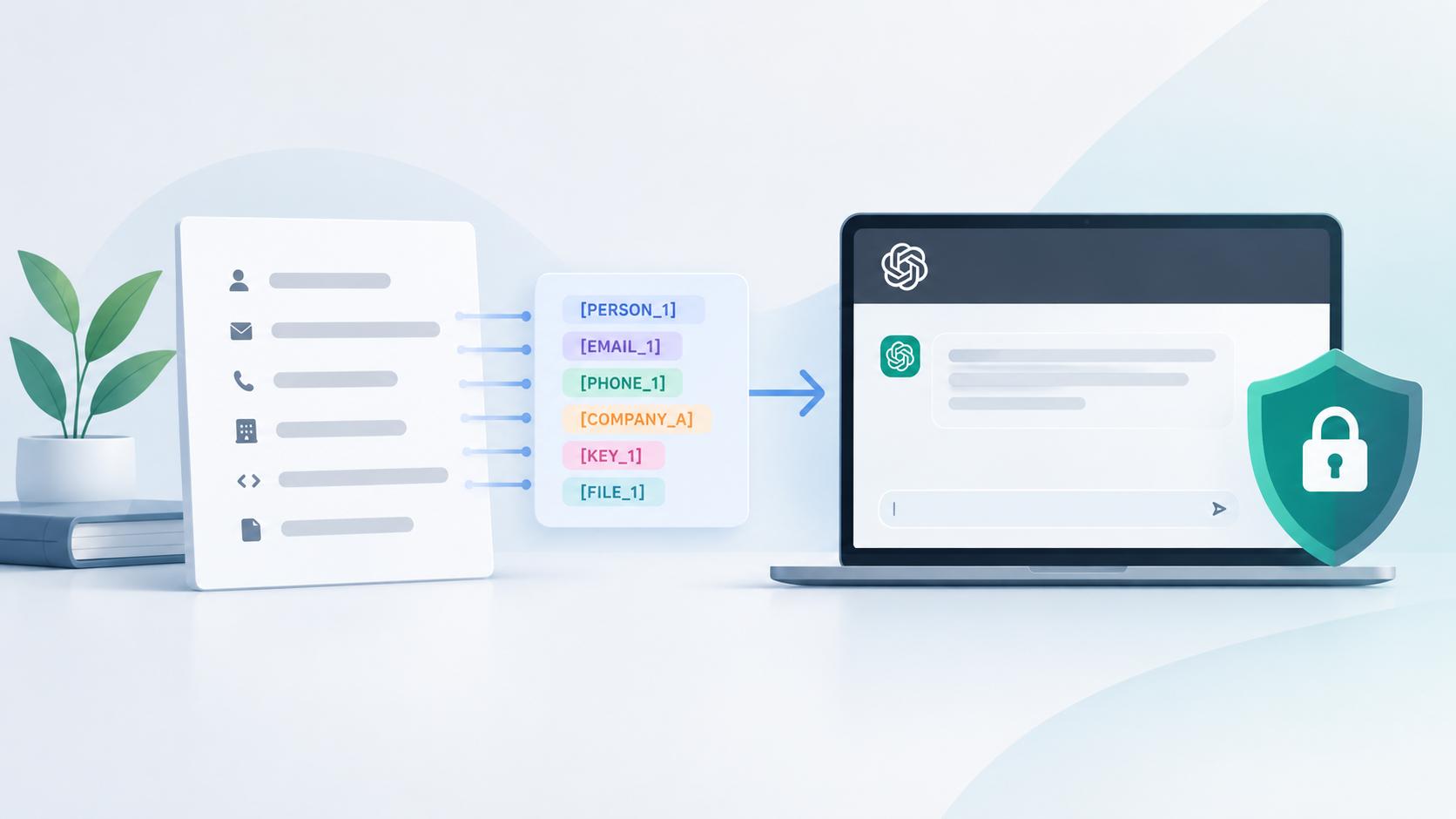
How to anonymize data before using ChatGPT:
- Scan your prompt for PII — names, emails, phone numbers, API keys, proprietary data.
- Replace each identifier with a placeholder (e.g., [PERSON_1], [COMPANY_A]).
- Store the real-to-placeholder mapping locally — never in a cloud service.
- Paste only the cleaned prompt into ChatGPT.
- Swap the placeholders back in ChatGPT’s response using your mapping.
Why You Need to Anonymize Data Before Using ChatGPT
What OpenAI Actually Does With Your Prompts
By default, ChatGPT (free and Plus tiers) stores your prompts and may use them to improve its models. You can toggle this off in settings, but even then, OpenAI retains data for up to 30 days for abuse monitoring — as stated in OpenAI’s privacy policy (updated February 2026).
The “delete chat” button is not what it seems. In the NYT v. OpenAI case, a federal court ordered OpenAI to preserve all user data — including conversations users believed they had deleted. Your prompts create a legal trail that persists well beyond what you see in the interface.
Real Incidents That Proved the Risk
In early 2023, Samsung engineers pasted proprietary semiconductor source code into ChatGPT on three separate occasions within a single month. The company discovered that confidential code — including equipment measurement databases and yield calculation programs — had been submitted to an external AI service, potentially entering OpenAI’s training pipeline. Samsung subsequently banned all employee use of generative AI tools, as reported by Bloomberg.
Samsung wasn’t alone. JP Morgan, Amazon, and Accenture all restricted or outright banned ChatGPT access for employees in the months that followed. Italy’s data protection authority (the Garante) temporarily banned ChatGPT entirely, prompting the EDPB to form a dedicated ChatGPT task force to investigate GDPR compliance across the EU.
These weren’t hypothetical risks. They were expensive, public lessons.
The Compliance Angle You Can’t Ignore
Three regulatory frameworks make this particularly non-optional:
GDPR Article 5(1)(c) establishes the principle of data minimization: you must send only what the task requires. If you’re a data controller processing EU residents’ personal data, pasting that data into a US-based AI service without adequate safeguards is a problem — regardless of your intentions. The ICO in the UK has taken a similarly firm position on LLMs and personal data processing.
HIPAA is even more blunt. Protected health information (PHI) pasted into a tool that doesn’t have a signed Business Associate Agreement is a violation. Period. ChatGPT’s standard tiers do not offer a BAA.
OWASP’s LLM Top 10 (2025 edition) now ranks Sensitive Information Disclosure — LLM02 — as one of the highest risks in LLM applications, up from sixth place in the previous version. The primary attack vector? Users voluntarily putting sensitive data into prompts.
CCPA adds another layer for California residents’ data. The pattern is clear across every jurisdiction: the responsibility sits with you, the person pasting the data, not with OpenAI.
What Counts as Sensitive Data — A Quick-Reference Checklist
Before you can anonymize anything, you need to know what to look for. This is less obvious than it sounds. A mistake I often see: people scrub names and emails but leave in a job title, a department, and a date — which in a small company is just as identifying.
| Category | Examples |
|---|---|
| Personal identifiers (PII) | Full names, email addresses, phone numbers, home addresses, dates of birth, SSNs, national IDs |
| Health data (PHI) | Patient names, diagnoses, medical record numbers, insurance IDs — HIPAA’s Safe Harbor method lists 18 specific identifiers |
| Financial data | Credit card numbers, bank accounts, salary figures, transaction amounts, revenue numbers |
| Corporate / proprietary | Trade secrets, internal project names, unreleased product details, client names, deal sizes |
| Technical secrets | API keys, database connection strings, internal URLs/endpoints, passwords, auth tokens |
| Quasi-identifiers | Combinations that re-identify: rare job title + small ZIP code + specific date can pinpoint a person even without their name |
That last row matters more than most people think. Re-identification risk from quasi-identifiers is what trips up teams who believe they’ve “anonymized” a dataset by removing names. If your company has one “Senior Blockchain Architect” in a town of 8,000, the title alone is identifying.
A practical rule: if you wouldn’t post it on LinkedIn, don’t paste it into ChatGPT without cleaning it first.
Anonymization vs. Pseudonymization — Which Do You Actually Need?
Most guides use these words interchangeably. They’re not the same thing, and the difference determines your legal exposure.
Anonymization (Irreversible)
True anonymization permanently removes all identifying information. There’s no mapping, no way back. The data can never be linked to a specific person.
This is what you’d use for publishing a research dataset or sharing aggregate statistics. Techniques include generalization (exact ages become age ranges), k-anonymity (ensuring each record matches at least k other records), differential privacy (adding mathematical noise), and generating entirely synthetic data.
For most ChatGPT workflows, full anonymization is overkill — and counterproductive. If you’re asking ChatGPT to rewrite a client email and you anonymize the client’s name permanently, you can’t use the output.
Pseudonymization (Reversible — and Usually What You Want)
Pseudonymization replaces identifiers with placeholders while you keep a private mapping to swap them back. “Sarah Chen” becomes [PERSON_1]. Your local spreadsheet knows that [PERSON_1] = Sarah Chen. ChatGPT never sees the real name.
This is the right approach for 90% of day-to-day ChatGPT use. You protect the data in transit while keeping the output usable.
One important nuance: under GDPR, pseudonymized data is still classified as personal data because re-identification is theoretically possible (you hold the mapping). So your mapping table itself needs protection — don’t store it in a shared Google Sheet.
My recommendation: For most readers of this guide, pseudonymization with a local mapping is the move. Full anonymization is for researchers and dataset publishers, not for someone asking ChatGPT to polish a performance review.
How to Anonymize Your ChatGPT Prompts — Step by Step
I’ll walk through this using the HR email from the introduction as a running example. The same process works for any text.
Original prompt (DO NOT paste this):
“Rewrite this termination letter for Sarah Chen, Employee ID 40871, salary $94,200, who has been at Meridian Technologies since March 2019. Her manager David Park (david.park@meridiantech.com) approved the termination on 01/15/2025. Please make the tone more professional.”
Step 1 — Audit Your Prompt for Sensitive Data
Read your prompt as if it were about to be published on the front page of your company’s intranet. Highlight every name, number, email, company name, date, and figure.
In the example above, there are seven sensitive items: two personal names, an employee ID, a salary, a company name, an email address, and a date tied to a specific action.
Step 2 — Classify Each Item by Sensitivity
Not everything needs the same treatment. A quick triage:
- Must remove: Personal names, employee ID, salary, email address — these directly identify individuals.
- Should generalize: The specific date could become [DATE_1] or “mid-January” depending on whether the exact date matters for the task.
- Can leave: “termination letter” and “make the tone more professional” contain no identifying information. ChatGPT needs these to do its job.
Step 3 — Replace Identifiers With Placeholders
Use a consistent, distinctive naming convention. I prefer XPERSON1X, XCOMPANY1X format over [PERSON_1] because ChatGPT occasionally interprets bracketed text as instructions rather than placeholders. But brackets work fine in most cases — pick one style and stick with it.
Anonymized prompt (safe to paste):
“Rewrite this termination letter for [PERSON_1], Employee ID [ID_1], salary [SALARY_1], who has been at [COMPANY_A] since [DATE_1]. Her manager [PERSON_2] ([EMAIL_1]) approved the termination on [DATE_2]. Please make the tone more professional.”
Consistency matters: if [PERSON_1] appears three times in your prompt, use the same placeholder every time. ChatGPT needs referential consistency to produce a coherent response.
Step 4 — Keep a Local Mapping Table
Store your real-to-placeholder pairs somewhere that never touches the internet:
| Placeholder | Real Value |
|---|---|
| [PERSON_1] | Sarah Chen |
| [PERSON_2] | David Park |
| [ID_1] | 40871 |
| [SALARY_1] | $94,200 |
| [COMPANY_A] | Meridian Technologies |
| [EMAIL_1] | david.park@meridiantech.com |
| [DATE_1] | March 2019 |
| [DATE_2] | 01/15/2025 |
A local text file, a note in your password manager, or even a sheet of paper works. The point is that this mapping never enters a cloud service.
Step 5 — Submit the Cleaned Prompt to ChatGPT
Paste only the anonymized version. Optionally, use Temporary Chat mode so no history is saved, or use the OpenAI API with training data opt-out for an additional layer.
Step 6 — De-Anonymize the Response
ChatGPT’s response will contain your placeholders. Use find-and-replace (Ctrl+H) to swap each one back in.
ChatGPT’s response (with placeholders):
“Dear [PERSON_1], after careful consideration, [COMPANY_A] has made the decision…”
Your final output (after de-anonymization):
“Dear Sarah Chen, after careful consideration, Meridian Technologies has made the decision…”
Step 7 — Clean Up After Yourself
Delete the chat, or better yet, use Temporary Chat mode so nothing persists. If you’re using the API, confirm your organization’s data-retention settings are configured for zero retention.
Best Tools for Anonymizing ChatGPT Prompts
You can do everything above with manual find-and-replace. But after testing a dozen tools over the past year, I can tell you: automation catches things you’ll miss. I once ran a “cleaned” prompt through Microsoft Presidio and it flagged a phone number I’d skimmed right past — buried in the middle of a paragraph.
Here’s how the main options compare. I’ve tested every free tool on this list personally; the enterprise tools I’ve evaluated through demos and trial accounts.
Comparison Table
| Tool | Type | Free? | Runs Locally? | Auto-Detects PII? | De-Anonymization? | Best For |
|---|---|---|---|---|---|---|
| Caviard | Chrome extension | Yes | Yes (browser) | Yes (NER) | Yes | Quick prompt cleaning, low friction |
| ONYRI Sanitize | Chrome extension | Freemium | Yes (browser) | Yes | Yes (reversible tokens) | One-click workflow, GDPR-conscious teams |
| GPT Privacy | Chrome extension | Yes | Yes (browser) | Yes | Yes | Lightweight, customizable rules |
| Anonyma.chat | Chrome extension | Yes | Yes (browser) | Manual + auto | Yes | Custom word management |
| SafePrompt | Chrome extension (open source) | Yes | Yes (browser) | Yes | Partial | Developers who also handle images |
| OctoMask | Local web tool (open source) | Yes | Yes | Yes (regex + NER) | Yes | Multi-language, developer-oriented |
| Microsoft Presidio | Python SDK (open source) | Yes | Yes | Yes (advanced NER) | Configurable | Automated pipelines, custom entity detection |
| spaCy NER | Python library (open source) | Yes | Yes | Yes (custom models) | Custom | ML engineers building tailored detection |
| Parfum | Python library (open source) | Yes | Yes | Yes | Configurable | Cleaning chat logs before fine-tuning |
| Nymiz | Enterprise platform | Paid | Cloud/on-prem | Yes (102 languages) | Yes + synthetic data | Regulated industries, healthcare, finance |
| Private AI | Enterprise API | Paid | On-prem option | Yes (50+ entities) | Yes | Compliance-heavy orgs needing audit trails |
| ARX | Desktop tool (open source) | Yes | Yes | Statistical methods | No (anonymization only) | Researchers, dataset-level work |
If You’re a Non-Technical User — Start Here
Install Caviard or ONYRI Sanitize. Both are Chrome extensions that take about 30 seconds to set up. You type your prompt, click a button, and the extension scans for PII, swaps it with placeholders, and gives you a clean version to paste. When the response comes back, it reverses the process.
In practice, Caviard is slightly faster at auto-detection. ONYRI Sanitize has a more polished de-anonymization flow and better handles edge cases where ChatGPT rephrases your placeholders. Both run entirely in your browser — nothing is sent to their servers.
The honest limitation: browser-based NER isn’t perfect. I’ve found that both tools reliably catch names, emails, and phone numbers but occasionally miss context-dependent identifiers like project codenames or internal jargon. A quick manual scan after the auto-detection is worth the 15 seconds.
If You’re a Developer — Build a Pipeline
Microsoft Presidio is the strongest open-source option for automated pre-processing. It uses spaCy’s NER models under the hood but adds a structured framework for defining custom PII entities and anonymization operators. You can pipe text through Presidio, get back a cleaned version with a mapping, send that to the OpenAI API, and de-anonymize the response — all in about 40 lines of Python.
Parfum is worth knowing about if you’re cleaning chat logs or conversational data before fine-tuning. It’s purpose-built for that workflow and handles the messiness of multi-turn conversations better than Presidio.
If You’re in a Regulated Enterprise
Nymiz and Private AI justify their price tags with audit trails, compliance documentation, and support for 50+ entity types across dozens of languages. If you need to prove to a regulator that every prompt was scrubbed before it left your infrastructure, these tools generate the logs that make that possible.
At this scale, also consider ChatGPT Enterprise or the OpenAI API with a signed Data Processing Addendum. ChatGPT Enterprise provides zero data retention by default, SOC 2 compliance, and admin controls. ChatGPT Team sits in the middle — prompts are not used for training, but retention policies are less configurable.
How to Anonymize Code and API Keys (The Gap Most Guides Miss)
Every guide on how to anonymize data before using ChatGPT focuses on names and emails. Almost none address what developers paste dozens of times a day: code with embedded secrets.
When I tested a batch of 50 real ChatGPT coding prompts from a development team (with permission), 14 contained at least one hardcoded secret — API keys, database connection strings, internal endpoint URLs, or auth tokens. The developers knew not to paste names. It never occurred to them that stripe.api_key = "REPLACE_WITH_YOUR_STRIPE_KEY" was just as sensitive.
Before (DO NOT paste this):
import stripe
stripe.api_key = "REPLACE_WITH_YOUR_STRIPE_KEY"

conn = psycopg2.connect(
    host="prod-db.meridiantech.internal",
    password="Xk9#mP2$vL7nQ"
)
After (safe to paste):
import stripe
stripe.api_key = "sk_test_PLACEHOLDER_KEY"

conn = psycopg2.connect(
    host="db.example.com",
    password="PLACEHOLDER_PASSWORD"
)
Three things to note here. First, use syntactically valid fake values, not blanks — ChatGPT needs realistic-looking code structure to give useful debugging help. Second, swap internal hostnames and URLs, not just passwords. prod-db.meridiantech.internal reveals your company name and infrastructure naming conventions. Third, scan comments too — developers love documenting workarounds with phrases like “ask David in infrastructure” or “the Acme Corp integration.”
For automation, run a secrets scanner like truffleHog or detect-secrets before pasting. These tools are designed for git pre-commit hooks but work just as well as a pre-ChatGPT screen.
The De-Anonymization Step Most Guides Skip
Most articles treat de-anonymization as trivial: “just swap the placeholders back.” In practice, there are three pitfalls that trip people up.
When ChatGPT Rephrases Your Placeholders
ChatGPT sometimes interprets placeholders as variables and “helpfully” rephrases them. I’ve seen [PERSON_1] become “the first person mentioned,” “the employee,” or simply dropped from the sentence entirely. This happens more often with natural-language placeholders than with code-style ones.
Mitigation: use distinctive, ugly placeholders that ChatGPT is unlikely to rephrase. XPRSN1X works better than [Person 1]. Or prefix your prompt with: “Treat all bracketed placeholders like [PERSON_1] as literal text. Do not rephrase, remove, or interpret them.”
Multi-Turn Conversation Consistency
If you introduce [COMPANY_A] in message 1, you need the same placeholder in message 5. This is easy to forget in a long conversation. Keep your mapping table open alongside the chat window and reference it before every new message.
Batch De-Anonymization for Long Outputs
For responses longer than a few paragraphs, manual find-and-replace is error-prone. The browser extensions (Caviard, ONYRI Sanitize) handle this automatically if you used them for the initial anonymization. If you did it manually, a simple Python script with str.replace() chained for each mapping entry takes 10 seconds to write and saves minutes of tedious swapping.
What OpenAI’s Own Privacy Settings Actually Do
A common misconception: “I turned off chat history, so I’m safe.” That’s only partly true. Here’s what each setting actually controls, based on OpenAI’s current terms of use (updated March 2026).
The “Improve the Model” Toggle (Free and Plus)
Turning this off in Settings → Data Controls stops your prompts from being used for training. But OpenAI may still retain them for up to 30 days for safety and abuse monitoring, as of mid-2026. Your data still travels to and is processed on OpenAI’s servers. This toggle reduces exposure; it does not eliminate it.
Temporary Chat Mode
No conversation history is saved. Data is not used for training. This is the closest to “ephemeral” on the free and Plus tiers. The trade-off: you lose the conversation entirely — no going back to reference it later.
ChatGPT Team and Enterprise
ChatGPT Team excludes prompts from training by default and adds workspace admin controls. ChatGPT Enterprise goes further: zero data retention, SOC 2 Type 2 compliance, SSO, and dedicated support. The OpenAI API data usage policy confirms that the API (GPT-4 and later models) does not use data for training by default and offers configurable retention down to zero.
Why Privacy Settings Alone Aren’t Enough
Even with every toggle maxed out, your data still transits OpenAI’s infrastructure. If OpenAI’s policies change, if their servers are breached, or if a court orders data preservation (as has already happened), your raw prompts are exposed.
Anonymizing before submission is a defense-in-depth measure. It protects you even if every other safeguard fails. Privacy settings and anonymization are complementary — not alternatives.
The Anonymization Paradox — Can You Use ChatGPT to Anonymize Your Data?
Here’s an irony I see constantly: people paste raw, sensitive text into ChatGPT and ask it to “remove all personal information from this document.” The model does a decent job. The problem is that you’ve already sent the unredacted data to OpenAI’s servers. The anonymization happened after the exposure, not before. It’s like mailing your bank statements to a stranger and then asking them to shred the copies.
When this is actually fine: The data isn’t regulated, you’re using ChatGPT Enterprise with zero retention or the API with a DPA, or the “sensitive” information is already semi-public (like a press release draft with named executives).
When it’s dangerous: PHI under HIPAA, financial PII under any jurisdiction, anything where you’re a GDPR data controller, or data belonging to minors. In these cases, the transmission itself is the violation — it doesn’t matter that the output is cleaned.
The better approach: run a local NER tool (Presidio, spaCy, or one of the browser extensions) to detect and replace PII before the text ever leaves your machine. Then use ChatGPT only on the already-cleaned version. Detection happens locally. Processing happens remotely. The sensitive data never crosses the boundary.
Building an Enterprise Anonymization Pipeline
For teams processing more than a handful of prompts per day, manual anonymization doesn’t scale. Here’s the architecture I’d recommend, based on what I’ve seen work at mid-size companies:
Raw text
  → PII Scanner (Presidio / Private AI / Nymiz)
    → Placeholder swap + mapping stored (encrypted, local)
      → OpenAI API call (zero-retention configured)
        → Response received
          → De-anonymization using stored mapping
            → Audit log entry (who, when, what was scrubbed)
The key components: a named entity recognition (NER) engine for detection, an encrypted local mapping store, API calls with data retention set to zero, and an audit log that records what was anonymized (without recording the actual sensitive values).
For healthcare organizations, the HIPAA Safe Harbor method requires removing 18 specific identifier types. The Expert Determination method is an alternative that uses statistical analysis to prove re-identification risk is “very small” — this is more flexible but requires a qualified expert to certify.
Enterprise tools like Nymiz and Private AI justify their cost here because they provide the audit trail that regulators expect to see during an investigation. Open-source tools like Presidio can do the technical work, but you’ll need to build the logging and compliance documentation yourself.
Frequently Asked Questions
Does ChatGPT store my data?
Yes. On free and Plus tiers, conversations are stored and may be used for model training unless you opt out. Even with the opt-out, OpenAI retains data for up to 30 days for safety monitoring (as of mid-2026). ChatGPT Team excludes training by default. ChatGPT Enterprise offers zero retention. The API does not train on your data by default and supports configurable retention.
Is it a GDPR violation to paste personal data into ChatGPT?
It can be. If you’re a data controller under GDPR, sending EU residents’ personal data to OpenAI (a US-based processor) without adequate safeguards — such as a Data Processing Addendum, Standard Contractual Clauses, or prior anonymization — may violate GDPR’s data transfer and data minimization requirements. The EDPB’s dedicated ChatGPT task force report addresses this directly.
Can ChatGPT itself anonymize data for me?
Technically, yes — it can identify and replace PII in text. But doing so requires sending the raw, unredacted data to OpenAI first, which defeats the purpose. Use a local tool (Presidio, Caviard, ONYRI Sanitize) to anonymize ChatGPT prompts before submission, then send only the cleaned text.
What types of data should I never paste into ChatGPT?
PHI covered by HIPAA, data protected by attorney-client privilege, API keys and secrets, data belonging to minors, financial account credentials, and anything your company’s information security policy classifies as confidential or restricted. When in doubt, anonymize it.
Are there free tools to anonymize ChatGPT prompts?
Yes. Caviard, GPT Privacy, OctoMask, and SafePrompt are all free, open-source, and run locally in your browser. For developers, Microsoft Presidio and Parfum are free Python libraries. See the comparison table above for detailed feature breakdowns.
Is the ChatGPT API safer than the web interface?
In specific ways, yes. API data is not used for model training by default, retention is configurable (including zero retention), and there’s no persistent chat history. But the data still transits OpenAI’s infrastructure during processing. Anonymization before submission remains best practice regardless of which interface you use.
How do I anonymize data in Excel before using ChatGPT?
For small datasets, use Excel’s find-and-replace (Ctrl+H) to swap column values with placeholders before copying the data into a prompt. For larger datasets, export to CSV and run it through a Python script using Presidio or pandas with regex-based replacement. Several of the browser extensions (Caviard, ONYRI Sanitize) also work on pasted tabular data.
The Bottom Line
Anonymizing data before using ChatGPT isn’t paranoia — it’s basic professional hygiene, on par with not emailing passwords in plaintext. The workflow is simple: scan, swap, submit, swap back.
If you do one thing after reading this, install Caviard or ONYRI Sanitize and run your next prompt through it. That single step — about 30 seconds of effort — puts you ahead of the majority of organizations still pasting raw client data into ChatGPT and hoping for the best. The tools are free, they run locally, and they work. There’s no reason not to start today.