

Search “AI task management tools” and nearly every article on page one is written by a company selling one of the tools on the list. Teamwork.com puts TeamworkAI first. Motion puts Motion first. Every vendor blog, somehow, concludes that its own product is the best fit for you.
That’s not necessarily dishonest — these companies genuinely know their own products well. But it makes it hard to get a straight answer to a simple question: which AI task management tool actually fits your situation?
This guide takes a different approach. We’re not selling a task management tool, so there’s no reason to crown a single winner. Instead, we’ll walk through what AI task management actually does, which tools do it well (and where each one falls short), what it really costs, and — this is the part every other comparison skips — what nobody’s telling you about data privacy once you hand your work over to an AI system.
Why Almost Every “Best AI Task Manager” List Is Secretly a Sales Pitch
Here’s a pattern worth noticing. Motion’s own comparison ranks Motion first. Teamwork’s ranks TeamworkAI first. Avoma’s ranks Avoma first. Each article runs a fair-sounding methodology, lists honest pros and cons for competitors, and then — somehow — lands on the tool the author happens to sell.
The reason this matters: when the person explaining the tradeoffs profits from your conclusion, the “comparison” quietly bends toward their product. You’ve probably felt it — the article with five balanced-looking sections that always ends with a big free-trial button for the writer’s own company.
So here’s how to read this piece. We’ll give you the genuine strengths of each tool, where each one is the right call, and where each one falls short — including the tools we’d naturally be biased toward if we sold one. There’s no product to push here, so you can take the recommendations at face value.
What Is AI Task Management, Really?
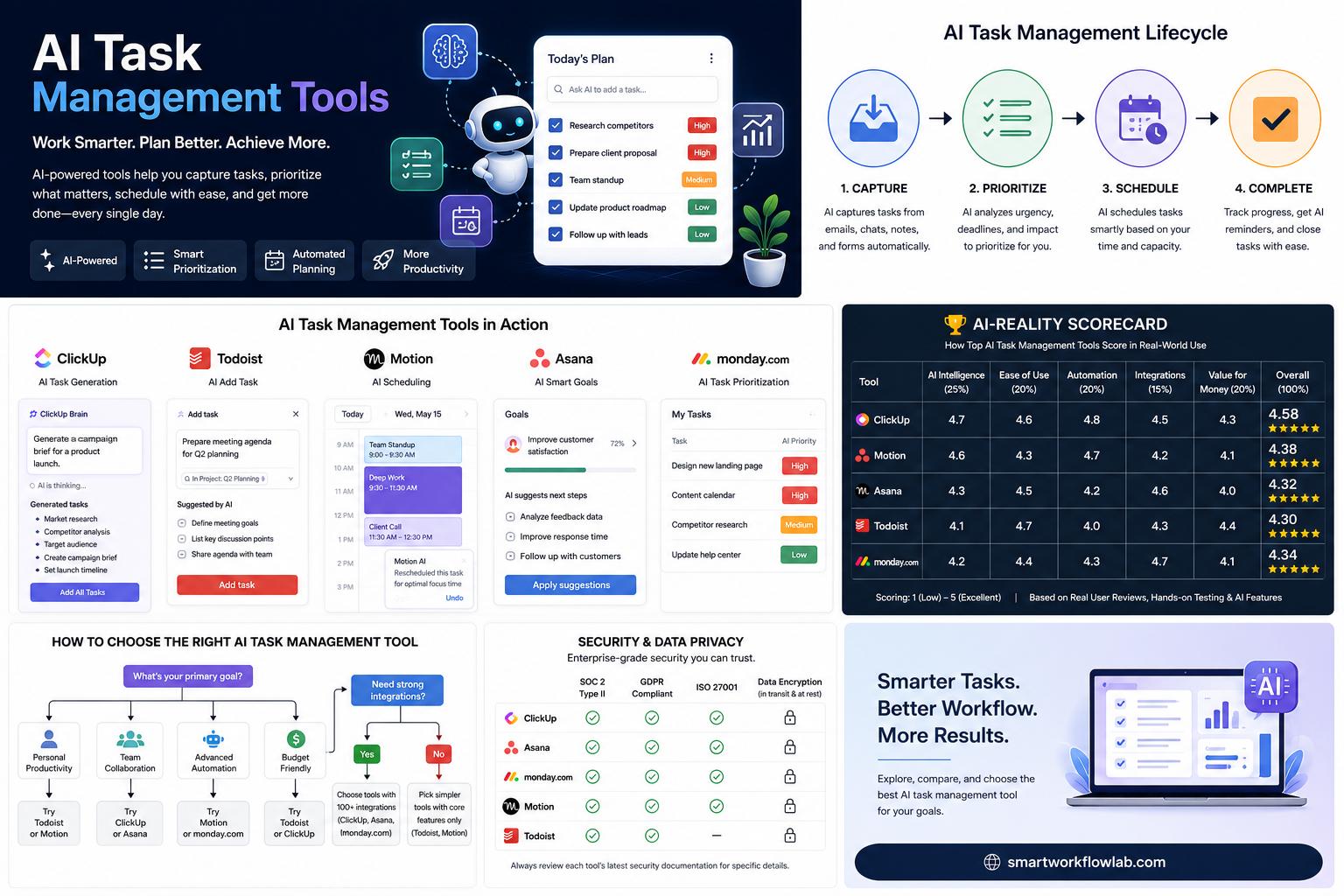
AI task management is the use of artificial intelligence — usually machine learning and natural language processing — to help you plan, prioritize, organize, and complete work with less manual effort. Instead of a static list you update by hand, an AI task manager can suggest what to work on next, automatically slot tasks into your calendar, generate a task list from a project description or meeting notes, and update statuses or send reminders without you lifting a finger.
The real difference from a traditional to-do list is initiative. A regular task manager stores what you tell it. An AI task manager analyzes that information — deadlines, dependencies, your calendar, your past behavior — and makes active recommendations or takes action on your behalf.
Four capabilities show up across nearly every tool in this category, though not every tool does all four well:
- Smart prioritization — ranking tasks by deadline, dependency, and importance instead of showing everything as equally urgent
- Task automation — auto-updating statuses, sending reminders, assigning work based on rules or workload
- Intelligent scheduling — placing tasks into your actual calendar and adjusting them when your day changes
- Content generation — turning a project brief, meeting transcript, or set of notes into a structured task list
Worth knowing before you compare tools: AI is only as useful as the data it works with. If your tasks lack clear deadlines, owners, or descriptions, the AI has little to reason about — a point worth sitting with before you expect dramatic results on day one.
Not All “AI” Is the Same: A Reality Check
Before comparing individual products, it helps to know that “AI” gets used loosely across this whole category. Some tools use large language models to genuinely interpret context — reading a meeting transcript and understanding who owns a follow-up task, for example. Others automate a handful of if-this-then-that rules and call it AI because that’s what the market now expects on a pricing page.
Neither approach is inherently bad. But you should know which one you’re paying for.
| Tool | Type of AI | Genuine ML/NLP or Rule-Based Automation? |
|---|---|---|
| Motion | Proprietary scheduling algorithm + prioritization engine | Primarily algorithmic, not a general-purpose LLM |
| ClickUp Brain | LLM-based (generation, summarization, Q&A) | Genuine LLM integration across workflows |
| Asana AI | LLM-based, tied to Asana’s “Work Graph” data | Genuine LLM integration |
| Notion AI | LLM-based (writing, summarization, Q&A) | Genuine LLM integration |
| TeamworkAI | LLM-based generation + rules-based scheduling logic | Mixed |
| Morgen AI Planner | Scheduling/optimization algorithm | Primarily algorithmic |
| Avoma | LLM-based (transcript analysis, action item extraction) | Genuine LLM integration |
During a free trial, test this yourself: give the tool a real, slightly vague task with a fuzzy deadline. Genuine AI reasoning tends to ask a clarifying question or make a context-aware suggestion; rule-based automation applies the same logic no matter the nuance.
Quick Comparison: The Field at a Glance
| Tool | Best For | Starting Price | Task Generation | Auto-Scheduling |
|---|---|---|---|---|
| Motion | Individuals wanting auto-scheduling | From $19/month (individual, annual) | Limited | Yes — core feature |
| ClickUp Brain | Cross-functional teams | Add-on to a paid ClickUp plan | Yes | No |
| Asana AI | Structured team workflows | Included from Business plan ($24.99/user/mo) | Yes | No |
| Notion AI | Doc-first teams | Full AI from Business plan (~$20/member/mo) | Yes (note-to-task) | No |
| TeamworkAI | Agencies, resource management | From $9.99/user/month | Yes (Project Wizard) | Yes (Smart Scheduler) |
| Morgen | AI scheduling with manual control | ~$15–30/month | No (relies on connected tools) | Yes — AI Planner |
| Avoma | Meeting-driven task capture | Tiered, contact vendor | Yes (from transcripts) | No |
Pricing reflects publicly listed rates at the time of writing. Software pricing changes often — confirm current figures on each vendor’s own pricing page before you buy.
The Tools, Reviewed Honestly
Motion — Best for Individual Auto-Scheduling
Motion merges your task list and calendar into one thing. You give it tasks with deadlines and estimated durations, and it slots them directly into your calendar, adjusting automatically when meetings shift or something runs long.
Where it’s strong: Genuinely reduces daily planning decisions for solo users and small teams. Calendar-first design cuts the context-switching between a task app and a calendar app. Motion is also the only tool in this guide that publicly displays both a SOC 2 Type II badge and a GDPR-compliance badge on its own site — a concrete, checkable trust signal that’s oddly rare in this category.
Where it falls short: Needs consistent manual task entry with clear durations to work well. Not built for complex, multi-team coordination with cross-department dependencies. Some long-time users on Reddit and G2 mention a learning curve and note certain basics (recurring tasks, notifications) have felt unfinished at times.
Best use case: A freelancer or small consulting team juggling client deadlines and meetings who wants one calendar that reflects reality instead of wishful planning.
ClickUp Brain — Best for Cross-Functional Teams
ClickUp Brain is the AI layer inside ClickUp, one of the most feature-dense project management platforms around. It’s strongest at generating tasks from natural language prompts or meeting notes and summarizing long comment threads.
Where it’s strong: Deep feature set — tasks, docs, chat, and dashboards in one workspace, with AI genuinely contextual across all of it rather than siloed to one feature.
Where it falls short: The sheer number of features can overwhelm new users; expect a real onboarding investment. Some long-term users report reliability issues that undercut productivity gains. AI works best once your workspace structure is already clean.
Best use case: A cross-functional team that wants tasks, docs, and AI-generated summaries in a single system instead of stitched together from several apps.
Asana AI — Best for Structured Workflows
Asana AI is built into Asana’s existing project structure, which the company calls its “Work Graph.” Because Asana already models goals, projects, and tasks with clear relationships, its AI leans on that structure for more specific, work-grounded suggestions.
Where it’s strong: Suggestions are grounded in real project data, not generic advice. Reporting and status automation genuinely cuts manual update time for project managers.
Where it falls short: AI value depends heavily on how consistently your team maintains the workspace — a messy setup produces fuzzy output. No auto-scheduling into a personal calendar. Full AI access requires the Business tier.
Best use case: A mid-size or enterprise team running structured projects and portfolios that wants AI-generated status reports without switching platforms.
Notion AI — Best for Doc-First Teams
Notion AI sits inside Notion’s flexible docs-and-database workspace. Rather than a dedicated scheduling engine, it’s strongest at converting written content — meeting notes, briefs, brainstorms — into structured task lists.
Where it’s strong: Extremely flexible; you design the task system rather than adopting a rigid template. Strong for teams where documentation and execution are tightly linked.
Where it falls short: Lacks native Gantt-style dependency management. AI identifies action items well but doesn’t always turn them into clean, trackable tasks unless your database is already set up to catch them.
Best use case: A content, product, or research team that already lives in Notion and wants task tracking to emerge from that same workspace.
TeamworkAI — Best for Agencies and Resource Management
TeamworkAI is built into Teamwork.com’s project platform and leans toward agency and client-services work: resource allocation, budget forecasting, and utilization tracking alongside standard task management.
Where it’s strong: AI features are genuinely tied to project context — team capacity, budgets, skills — rather than generic suggestions. Strong value for agencies juggling several concurrent client projects.
Where it falls short: Advanced features (utilization summaries, forecasting) are gated to higher-tier plans. Less useful outside agency-style resourcing needs. And worth noting: like most vendor content in this space, Teamwork’s own comparison unsurprisingly ranks TeamworkAI first.
Best use case: A marketing or IT services agency managing multiple client projects that needs AI-assisted resourcing and budget forecasting, not just task lists.
Morgen — Best for AI Scheduling Without Losing Control
Morgen takes a different stance than Motion: instead of fully automating your schedule, its AI Planner proposes a draft you review and approve, layered on top of task tools you may already use — Notion, Todoist, Obsidian.
Where it’s strong: Keeps a human in the loop — AI suggests, you approve. Strong integration depth with existing task tools rather than forcing a full switch.
Where it falls short: Not a full project management tool — no team resourcing or portfolio views. Needs pairing with a separate task manager for teams that need more than scheduling.
Best use case: Someone who already likes their task system and wants AI-assisted time-blocking layered on top, without giving up control of their calendar.
Avoma — Best for Meeting-Driven Task Capture
Avoma comes at task management from a different entry point entirely: conversations. It’s an AI meeting assistant that automatically extracts action items from meeting transcripts and turns them into tracked tasks.
Where it’s strong: Best-in-class for teams whose real work happens in live conversations — sales, customer success. Preserves the “why” behind a task, not just the task itself.
Where it falls short: Not designed to replace a full project board for planning work from scratch. Task accuracy depends on clear ownership language during meetings (“Sarah will follow up by Friday” works better than a vague commitment).
Best use case: A sales or customer success team where most tasks originate in calls, and the real problem is action items falling through the cracks after the call ends.
Worth Knowing About: Emerging and Adjacent Tools
A few tools are relevant to this category even outside the core seven above:
- monday.com markets itself as an AI Work Platform and has publicized recognition as a Leader in multiple Gartner Magic Quadrant reports for work management, according to its own blog. It also supports the Model Context Protocol (MCP), an open standard letting assistants like Claude, ChatGPT, and Microsoft Copilot connect to a monday.com workspace.
- Reclaim.ai takes a lighter touch than Motion — instead of becoming your home base, it sits on top of your existing Google Calendar and defends time blocks for tasks, habits, and priorities automatically.
- Google Workspace (Gemini) and Microsoft 365 Copilot are increasingly relevant because many teams already have AI task assistance bundled into tools they’re already paying for. Check what’s already included in your existing subscription before buying a separate AI task manager.
- Agentic AI assistants — Kai (from the team behind Morgen), Nia, and alfred_ — go further than suggesting priorities and actively take action: triaging your inbox, blocking prep time, following through on commitments without step-by-step instructions. Most are in early access or waitlist stages as of mid-2026, so treat them as ones to watch rather than mature options today.
What This Actually Costs
Vendor pricing pages change often, and “AI included” doesn’t always mean included at every tier.
| Tool | Free Plan? | Entry Paid Tier | AI Included at Entry Tier? |
|---|---|---|---|
| Motion | No | ~$19/month (individual, annual) | Yes |
| ClickUp | Yes | Varies — check current pricing | Typically an add-on, not bundled |
| Asana | Yes (no AI) | $10.99/user/month (Starter) | No — full AI needs Business tier |
| Notion | Yes (limited AI trial) | ~$10/member/month (Plus) | Limited — full AI needs Business tier |
| Teamwork.com | Yes (up to 5 users) | $9.99/user/month (Basics) | Basic features yes; advanced needs higher tiers |
| Morgen | Free trial only | ~$15–30/month | Yes |
| Avoma | Check vendor site | Tiered, contact for quote | Yes, within core plan |
Several vendors bundle only “basic” AI into entry-level plans and gate the features people actually want — resource forecasting, advanced automation rules — behind higher tiers. Before buying, map out which specific AI feature you need and confirm which plan tier actually includes it. Don’t assume “AI” on the pricing page covers everything mentioned in the marketing copy.
The Question Nobody’s Comparison Answers: Is Your Data Safe?
This is the biggest gap we found across existing content in this category — and it matters more here than in most software categories, because AI task managers often read your emails, meeting transcripts, and internal project data to work well.
When you connect an AI task manager to your email, calendar, or meeting recordings, you’re typically giving it access to sensitive operational information — client names, deal details, sometimes HR or legal matters if those tasks live in the same workspace. Before adopting any tool here, it’s worth understanding:
- Whether your data is used to train the vendor’s AI models, or kept isolated to your account
- Whether the vendor publishes a documented data retention policy
- Whether the tool offers enterprise controls like single sign-on, role-based permissions, and audit logs
- Whether the vendor has published independent security certifications
Two of the most commonly referenced trust signals in B2B software are SOC 2 Type II certification (an independent audit of a company’s data security controls, under standards set by the American Institute of CPAs) and GDPR compliance, relevant if you or your team handle data from the EU.
Of the tools reviewed here, Motion is the only one that visibly displays both a SOC 2 Type II badge and a GDPR badge on its own site. We couldn’t independently verify current certifications for the others from public information at the time of writing — that doesn’t mean they lack them, but it does mean you should check each vendor’s dedicated trust page directly rather than relying on marketing copy alone.
If your organization handles regulated data — healthcare, legal, financial services — treat “AI-powered” as a reason to ask more security questions, not fewer. Ask the vendor directly: is task data used to train models, and can that be disabled at the admin level?
A Decision Framework: Match the Tool to Where Your Tasks Come From
Forget generic “best for teams” lists. Answer these questions honestly, and the right tool usually becomes obvious.
- Where do most of your tasks originate? Meetings and calls → Avoma. Written docs and briefs → Notion AI. Structured project planning → Asana AI or ClickUp Brain. Personal, calendar-driven work → Motion or Morgen.
- What’s your team size? Solo or freelance → Motion or Reclaim.ai. Small team → Motion Team, Notion AI, or Teamwork’s entry tiers. Mid-size or enterprise → Asana AI, ClickUp Brain, or Teamwork’s higher tiers.
- What industry are you in? Agencies and client services → TeamworkAI, for resourcing and budgeting. Sales and customer success → Avoma. Product and content teams → Notion AI or ClickUp Brain. Non-tech industries (construction, healthcare, education) are underserved by most marketing in this space — the same evaluation logic still applies, so prioritize clear data-handling policies and low setup complexity over feature breadth.
- How much control do you want to hand over? Full automation, hands-off → Motion. AI suggests, you approve → Morgen.
Migrating Without Losing Your Data
Switching tools is where a lot of value gets lost in practice — mostly because teams move messy, incomplete task data into a new system and expect the AI to somehow fix it on its own.
Before migrating, check whether your existing tasks have clear owners, realistic due dates, and enough description for someone unfamiliar with the work to understand it. If a large share of your current tasks are missing this, fix that first. AI prioritization and scheduling can’t meaningfully rank or place tasks that lack deadlines or clear scope.
A simple migration sequence that works:
- Export your current task list, including due dates, owners, and status, in a format your new tool can import — usually CSV.
- Clean up duplicate or stale tasks before importing. Don’t carry years of clutter into a fresh system.
- Set up your core project or workspace structure before bulk-importing tasks.
- Import a small test batch first to confirm fields map correctly.
- Run both systems in parallel for one to two weeks before fully retiring the old tool.
- Confirm you can export your data back out if you ever need to switch again — check this before committing, not after.
The most common mistake teams make: migrating to an AI task manager expecting immediate results, without giving the AI clean, well-structured data to work with. These tools amplify good task management discipline. They don’t create it from scratch.
What Happens When the AI Gets It Wrong
AI task prioritization and scheduling aren’t infallible, and it’s worth planning for the times they aren’t.
Mis-prioritization. If a task lacks a clear deadline or dependency, the AI may rank it incorrectly. Most tools allow manual overrides — use them, especially in your first few weeks, and treat AI suggestions as a draft rather than a final decision.
Over-automation. Automatically reassigning or rescheduling tasks without review can create confusion if teammates aren’t aware a change happened. Check whether your tool notifies affected people when AI acts on their behalf.
Context loss. Tools that summarize long threads or meetings can occasionally miss an important detail. For anything with real consequences — contract terms, compliance deadlines — verify the AI-generated summary against the original source before acting on it.
Stale data drift. If an integration breaks — a calendar sync fails, an email connector loses access — AI recommendations will look confident while working from outdated information. Spot-check that connected data sources are actually syncing.
The Real ROI: A Formula, Not a Marketing Number
Most vendor content in this space cites precise-sounding numbers — “saves 5 to 10 hours weekly” — without a clear source. Rather than repeat unverified figures, here’s how to estimate ROI for your own team:
(Hours saved per person per week) × (average hourly cost per person) × (number of users) × 52 weeks − (annual subscription cost) = estimated annual value
To get a realistic “hours saved” number, don’t guess — track it. During a free trial, log how much time your team spends on task-related admin (status updates, rescheduling, chasing follow-ups) for one week before adopting the tool, then compare that to the same measurement after two to four weeks of real use. That gives you a number specific to your team, instead of a vendor’s marketing estimate.
How [Your Company] Helps
[Your Company] helps teams pick the right AI task management setup without the usual vendor bias — mapping where your tasks actually originate, your team’s structure, and your security requirements against the field above, then recommending the fit even when it isn’t the tool with the biggest marketing budget. That ranges from a lightweight Motion or Morgen setup for a solo operator to a full ClickUp or Asana rollout with proper governance for a growing team.
For teams who want to go deeper on one piece of this decision, this pairs naturally with our guides on choosing project management software and AI tool data security — so you invest in a system you can trust, not just one that demos well.
Frequently Asked Questions
1. What is an AI task manager?
An AI task manager is software that uses artificial intelligence — typically machine learning and natural language processing — to help you organize, prioritize, and complete tasks with less manual effort. Unlike a basic to-do list, it can actively suggest what to work on next, generate tasks from notes or briefs, and adjust schedules automatically.
2. What’s the best AI task management tool?
There isn’t a single best tool — it depends on your use case. Motion and Reclaim.ai are strong for individual auto-scheduling, Asana AI and ClickUp Brain suit structured team workflows, Notion AI fits doc-first teams, TeamworkAI suits agencies managing client resourcing, and Avoma is built for meeting-driven task capture.
3. Is there a free AI task management tool?
Several tools offer free tiers with limited AI functionality, including ClickUp, Asana (Personal plan, no AI), Notion (limited AI trial), and Teamwork.com (Free Forever, up to 5 users, with basic AI). Full AI feature access is generally reserved for paid tiers.
4. Can AI automatically prioritize my tasks?
Yes. Most tools in this category analyze deadlines, dependencies, and workload to recommend a priority order. Accuracy depends heavily on how complete and well-structured your task data is — vague tasks without deadlines are harder for AI to rank meaningfully.
5. Is AI task management secure?
It depends entirely on the vendor. Look for published SOC 2 Type II audits, a clear GDPR compliance statement, and a documented policy on whether your data is used to train AI models. Of the tools in this guide, Motion is the only one that displays both a SOC 2 Type II and GDPR badge directly on its site — for others, check the vendor’s dedicated trust page rather than assuming.
6. What is agentic AI in task management?
Agentic AI refers to systems that don’t just suggest actions but actively carry them out on your behalf — triaging your inbox, blocking prep time, or following through on commitments without step-by-step instructions. Tools like Kai, Nia, and alfred_ represent this emerging category, though most are still in early access as of mid-2026.
7. Do AI task managers replace project managers?
No. They reduce administrative overhead — status updates, scheduling, reminders — but strategic decisions, stakeholder communication, and judgment calls about scope and risk still require a human project manager or team lead.
8. How much does an AI task manager cost?
Entry pricing generally runs from roughly $10 to $30 per user per month, but many vendors gate the AI features people actually want — like forecasting or advanced automation — behind higher tiers. Always check which specific plan includes the AI feature you need, not just whether “AI” appears on the pricing page.
Final Thoughts
There’s no single “best” AI task manager, whatever the vendor comparisons say — the right choice depends on where your tasks come from and how your team already works. Auto-scheduling your personal day → Motion or Reclaim.ai. AI scheduling with more manual control → Morgen. Cross-functional projects with dependencies → ClickUp Brain or Asana AI. Documentation-heavy, flexible workspace → Notion AI. Agency work with resourcing and budgets → TeamworkAI. Tasks that mostly originate in meetings → Avoma.
Before you commit to an annual plan, do two things: run a real trial using your actual, messy task list instead of a demo dataset, and ask the vendor directly whether your data trains their AI models. Costs and features in this space change quickly, so treat the figures here as a starting point and confirm current specifics before you buy.
Want a straight answer for your specific team? [Your Company] helps businesses choose and set up the right AI task management tool — honestly, even when it’s the smaller-budget option. Start with our project management software buyer’s guide, or get in touch for a no-pressure second opinion.