Most companies have already tried a chatbot, and most companies have already been mildly disappointed by one. It answers a narrow set of questions well and falls apart the moment a request has more than one step to it.
AI agents are a different kind of tool. Instead of answering a single question, an agent can plan a short sequence of actions, use software tools to carry them out, and adjust based on what it finds along the way — checking an order status, updating a record, and drafting a follow-up message, all from one request, without a person manually doing each step in between.
This guide explains what AI agents actually are, how they differ from chatbots and older automation tools, where businesses are using them today, and how to roll one out without the common mistakes that turn a promising pilot into an expensive disappointment.
What Are AI Agents?
An AI agent is a software system built on a large language model that can understand a goal, plan the steps needed to reach it, use external tools or data sources to take action, and adjust its approach based on the results — largely without a person directing each individual step.
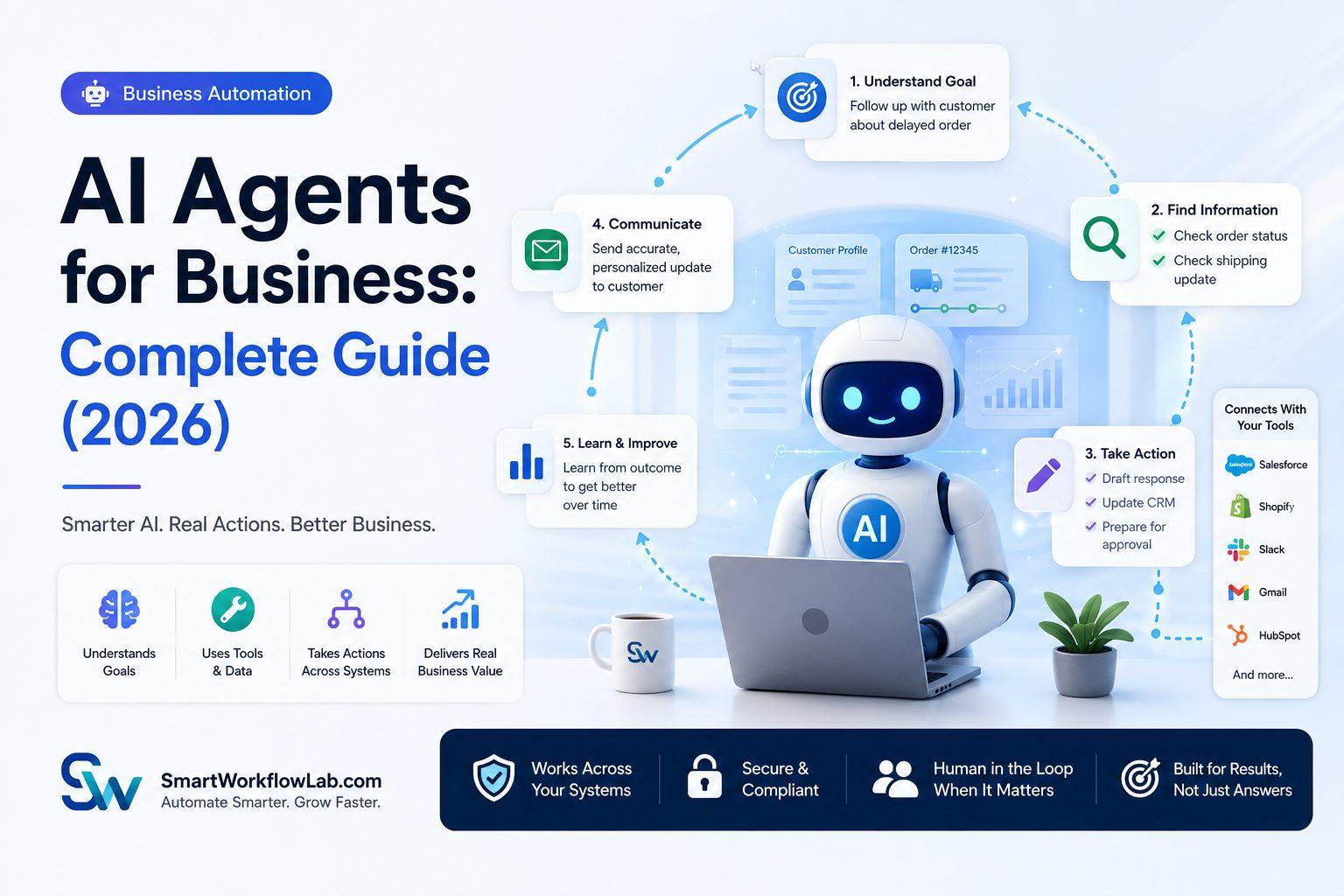
The easiest way to picture this is to compare it to hiring a capable new employee versus buying a calculator. A calculator (like a basic chatbot or a rules-based script) does exactly one thing, exactly the way it’s told, every time. A new employee, once trained, can take a general instruction — “follow up with this customer about their delayed order” — and figure out the steps: check the order status, look up the shipping carrier, draft a message with an accurate update, and flag it for approval before sending. An AI agent is built to work more like the employee than the calculator.
Here’s a concrete business example. A customer emails asking why their order hasn’t arrived. A chatbot might recognize the word “order” and pull up a generic tracking link. An AI agent, given access to the order management system, the shipping carrier’s API, and the company’s tone guidelines, can look up the actual order, check the real shipping status, recognize that the package is stuck at a customs checkpoint, draft a specific and accurate response explaining the delay, and route it to a human agent for a quick approval before it goes out. The difference isn’t just about being smarter with words — it’s about actually doing something with real business systems.
It’s worth being precise about the distinction between an AI model and an AI agent, since the terms get blurred constantly. A large language model like the ones behind ChatGPT or Claude is the reasoning engine — it can understand language and generate a response. An agent is that same model wrapped with the ability to use tools, take multiple steps, and pursue a goal over time. The model is the brain; the agent is the brain plus hands, plus a to-do list.
How AI Agents Work
Most business AI agents follow a similar operating pattern, whether they’re handling a customer inquiry or processing an internal request.
Receiving information. The agent gets a request — a customer email, a support ticket, an internal form submission, or a scheduled trigger like “check inventory levels every morning.”
Understanding context. The agent interprets what’s actually being asked, pulling in relevant context: who the customer is, what they’ve asked before, what account or record the request relates to.
Planning actions. Rather than responding immediately, the agent breaks the goal into steps. For an order-delay inquiry, that might mean: look up the order, check shipping status, determine whether a refund or discount applies under policy, and draft a response.
Using business tools. The agent calls out to connected systems — a CRM, an inventory database, a shipping API — to gather real data rather than guessing.
Making decisions. Based on what it finds, the agent decides what to do next: proceed automatically, ask a clarifying question, or escalate to a human because the situation falls outside its defined authority.
Executing workflows. The agent takes the action — updating a record, sending a message, creating a ticket — within whatever boundaries have been set for it.
Learning from interactions. Well-designed systems capture outcomes and corrections, which improve future accuracy and help refine where the agent’s boundaries should sit.
Delivering results. The agent reports back — to the customer, to an employee, or to a dashboard — with a clear record of what it did and why.
A simple scenario helps show this in practice. A finance team sets up an agent to handle vendor invoice discrepancies. When an invoice doesn’t match its purchase order, the agent checks both records, identifies the specific mismatch (a quantity difference, say), drafts a clarification email to the vendor, and creates a task for the accounts payable team to review once the vendor replies — all without anyone manually spotting the mismatch first.
Types of AI Agents
Reactive AI Agents
These respond directly to a specific input without maintaining memory of past interactions. They’re useful for simple, self-contained tasks like classifying an incoming support ticket by topic.
Goal-Based Agents
These work backward from a defined objective, planning whatever steps are needed to reach it — for example, an agent tasked with “get this contract signed” that handles reminders, follow-ups, and status checks until the goal is met.
Utility-Based Agents
These weigh multiple possible actions against a defined set of priorities and pick the option that best balances them — useful in scenarios like inventory replenishment, where cost, speed, and supplier reliability all need to be weighed against each other.
Learning Agents
These improve their performance over time based on feedback and outcomes, such as an agent that gets better at predicting which support tickets are likely to escalate as it processes more corrected examples.
Conversational AI Agents
These handle natural back-and-forth dialogue, often layered with tool access so they can do more than talk — answering a question and then actually updating a record based on the conversation.
Autonomous AI Agents
These operate with minimal human involvement within a defined scope, executing multi-step tasks and only escalating when they hit a boundary they’re not authorized to cross.
Multi-Agent Systems
These involve several specialized agents working together — one handling data retrieval, another handling drafting, another handling approval routing — coordinating on a larger task none of them could complete alone.
Industry-Specific AI Agents
These are built or fine-tuned around the vocabulary, compliance requirements, and workflows of a particular industry, such as an agent trained specifically on insurance claims language and regulations.
AI Agents vs. Traditional Automation
| Factor | Traditional Automation (RPA/Scripts) | AI Agents |
|---|---|---|
| Decision making | Follows fixed rules | Makes contextual judgments |
| Flexibility | Breaks when input format changes | Adapts to new or unusual input |
| Learning ability | None — static logic | Can improve from feedback over time |
| Adaptability | Requires reprogramming for new scenarios | Handles variation within its defined scope |
| Human interaction | Minimal, scripted | Natural language, context-aware |
| Workflow complexity | Best for single, linear steps | Can plan and execute multi-step sequences |
| Scalability | Scales well for identical, repeated tasks | Scales well across varied, judgment-based tasks |
| Business value | Efficient for stable, high-volume processes | Valuable where variation and judgment matter |
The practical takeaway: traditional automation and AI agents aren’t competitors so much as different tools for different parts of the same process. A mature automation setup usually uses both — RPA for the predictable, rules-based steps, and an agent for the parts that require interpretation or judgment.
AI Agents vs. Chatbots
| Factor | Chatbots | AI Agents |
|---|---|---|
| Capabilities | Answer questions, follow scripted flows | Plan and execute multi-step tasks |
| Decision making | Limited, usually scripted | Context-based, within defined boundaries |
| Memory | Often session-based or none | Can retain context across a task or interaction history |
| Context awareness | Basic pattern matching | Deeper understanding of intent and history |
| Task execution | Typically cannot take real actions | Can use tools to update systems, send communications, trigger processes |
| Business applications | FAQ handling, basic triage | End-to-end process handling, cross-system tasks |
| Automation level | Conversational only | Conversational plus operational |
A practical example: a chatbot can tell a customer their order is “in transit” by pulling a status field. An agent can recognize the order is delayed beyond the promised window, check the reason, decide whether the situation qualifies for a proactive discount under company policy, and either apply it automatically or flag it for a human to approve — all without the customer needing to ask a second question.
AI Agents vs. Robotic Process Automation (RPA)
| Factor | RPA | AI Agents |
|---|---|---|
| Rule-based automation | Yes — follows exact, predefined steps | No — reasons through variable situations |
| Intelligence | None beyond configured logic | Contextual understanding via language models |
| Decision making | Fixed if/then logic | Judgment-based within defined limits |
| Learning | Static, requires manual updates | Can improve from corrected examples |
| Business applications | Data entry, report generation, system updates | Judgment-heavy tasks: triage, exception handling, drafting |
| Cost | Generally lower upfront | Often higher upfront, lower long-term maintenance for variable tasks |
| Implementation | Faster for simple, stable processes | Requires more planning around scope and guardrails |
| Scalability | Excellent for identical repeated tasks | Excellent for varied tasks requiring interpretation |
Choose RPA when a process is stable, well-defined, and unlikely to change format. Choose an AI agent when the process involves judgment calls, unstructured input, or enough variation that a fixed script would require constant maintenance. Many businesses end up combining both, using RPA for the deterministic steps and an agent for the parts that require interpretation — a pattern covered in more depth in our guide to AI business automation.
How Businesses Are Using AI Agents
Customer Support — triaging tickets, resolving common issues end-to-end, and preparing full context summaries before escalating complex cases to a human agent.
Sales — qualifying leads, drafting personalized outreach, and updating CRM records automatically after a call.
Marketing — generating and scheduling personalized campaign content, and monitoring campaign performance to suggest adjustments.
Finance — matching invoices to purchase orders, flagging discrepancies, and drafting vendor communications about mismatches.
HR — screening resumes against role requirements, scheduling interviews, and answering routine employee benefits questions.
IT Operations — triaging support tickets, running standard diagnostic checks, and escalating issues that need engineer-level attention.
Legal — reviewing contracts for unusual clauses, extracting key terms and dates, and routing documents for the right level of review.
Healthcare — processing patient intake forms, drafting clinical documentation from recorded conversations, and handling insurance pre-authorization paperwork.
Manufacturing — monitoring equipment sensor data for early signs of failure and scheduling maintenance before a breakdown occurs.
Retail — adjusting inventory replenishment recommendations based on real-time sales data and flagging unusual demand shifts.
Supply Chain — coordinating between demand forecasts and supplier lead times to recommend order timing adjustments.
Logistics — optimizing delivery routes in real time and proactively notifying customers of delays.
Education — handling routine administrative inquiries and supporting personalized learning recommendations.
Real Estate — qualifying inbound leads and processing property document paperwork.
Insurance — handling first-notice-of-loss claims intake and flagging claims that need adjuster review.
Banking — supporting KYC document verification and flagging unusual transaction patterns for review.
Professional Services — drafting first-pass reports, summarizing client meetings, and tracking follow-up commitments.
Real Business Use Cases
The scenarios below are illustrative examples of how AI agents typically get applied — not documented case studies or guaranteed outcomes.
| Setting | Illustrative AI Agent Use Case |
|---|---|
| Small Businesses | An agent that handles routine customer inquiries and drafts invoices, freeing an owner from answering the same questions repeatedly |
| Startups | An agent supporting early sales operations — qualifying leads and updating a lightweight CRM without a dedicated sales ops hire |
| Large Enterprises | Multi-agent systems coordinating across finance, HR, and IT support to handle high volumes of routine internal requests |
| Healthcare | An agent that drafts clinical notes from a recorded visit for physician review, reducing after-hours documentation time |
| Manufacturing | An agent monitoring machine sensor data to flag likely maintenance needs before a failure interrupts production |
| Finance | An agent that reconciles vendor invoices against purchase orders and escalates only genuine discrepancies |
| Retail | An agent adjusting reorder recommendations based on real-time sales trends across store locations |
| Education | An agent handling routine administrative questions from students, freeing staff for more complex cases |
| Hospitality | An agent managing routine booking changes and guest communication outside of front-desk hours |
| Construction | An agent tracking project document status and flagging missing permits or approvals before they cause delays |
Benefits of AI Agents
Higher productivity — agents absorb multi-step, repetitive work that would otherwise consume employee time.
Lower costs — reduced manual processing time lowers the cost per transaction across high-volume workflows.
Better customer experience — faster, more accurate responses improve satisfaction, particularly for time-sensitive requests.
24/7 availability — agents don’t need shifts or time zones, which matters for global customer bases or after-hours requests.
Faster decisions — agents can gather and weigh relevant data in real time rather than waiting for a person to have availability.
Improved accuracy — well-configured agents reduce the errors that come from manual, repetitive data handling.
Scalability — a business can absorb growing transaction volume without growing headcount at the same rate.
Employee assistance — agents can handle first-pass drafting and research, letting employees focus on judgment and final decisions.
Business growth — freed-up capacity supports handling more customers or transactions without proportional cost growth.
Competitive advantage — businesses that automate a slow or frustrating part of their customer experience ahead of competitors tend to reset expectations across their market.
Important: These benefits depend heavily on the specific process, the quality of implementation, and ongoing oversight. They are not automatic or guaranteed outcomes.
Common Challenges and Risks
| Challenge | Practical Mitigation |
|---|---|
| Data privacy | Limit agent access to only the data needed for its specific task, and review data-handling policies with your vendor |
| Security risks | Use platforms with strong authentication and access controls, and log every action an agent takes |
| AI hallucinations | Require agents to cite or verify information from connected systems rather than generating answers from memory alone |
| Bias in AI models | Test agent outputs across varied scenarios and monitor for skewed patterns, especially in hiring or lending contexts |
| Integration complexity | Assess your existing software ecosystem early, since older systems may need custom connectors |
| Employee resistance | Communicate clearly what the agent will and won’t do, and involve employees in defining its scope |
| Compliance requirements | Build audit trails and explainability into any agent touching regulated data or decisions |
| Governance | Define clear ownership for what an agent is allowed to do autonomously versus what requires approval |
| Cost of implementation | Start with a narrow pilot to manage cost and prove value before wider rollout |
| Change management | Treat adoption as an ongoing process, with regular check-ins rather than a single training session |
None of these risks are reasons to avoid AI agents altogether. They’re reasons to define scope and oversight carefully before granting an agent real authority over business systems.
How to Successfully Implement AI Agents
- Identify repetitive business processes. Look for multi-step, judgment-based work that currently consumes significant employee time.
- Define measurable business objectives. Decide what success looks like — time saved, error reduction, response time — before you start.
- Assess your current software ecosystem. Understand what systems the agent will need to connect to and how mature those integrations are.
- Prepare and organize business data. An agent making decisions from messy or inconsistent data will produce messy, inconsistent results.
- Choose the right AI agent platform. Match the platform to your specific use case and existing tech stack rather than picking based on brand recognition alone.
- Build a pilot project. Start with one well-defined task rather than a broad, ambiguous mandate.
- Test in a controlled environment. Run the agent alongside your existing manual process before fully relying on it.
- Train employees. Make sure the people working alongside the agent understand its scope, limits, and escalation points.
- Monitor performance and KPIs. Track the metrics defined in step two against your baseline, honestly.
- Improve continuously. Use corrected exceptions to refine the agent’s scope and accuracy over time.
- Scale across departments. Expand to additional use cases once the pilot has proven reliable.
- Partner with experienced AI consultants when needed. A knowledgeable partner can help avoid common missteps around scope, security, and integration.
Popular AI Agent Platforms
Rather than recommending one platform as universally best, it’s more useful to understand the categories and where each tends to fit.
General-purpose model providers — OpenAI, Anthropic (Claude), and Google Gemini provide the underlying language models that power many custom and third-party agent systems, and increasingly offer their own agent-building tools directly.
Productivity-integrated assistants — Microsoft Copilot is built into the Microsoft 365 ecosystem, making it a natural fit for businesses already standardized on Office, Teams, and Outlook.
Cloud AI platforms — Amazon Bedrock, Azure AI, and Google Vertex AI offer enterprise-grade infrastructure for building and deploying custom agents, typically chosen by businesses with in-house technical teams or specific compliance and hosting requirements.
CRM and enterprise platform-native agents — Salesforce Agentforce and ServiceNow AI build agent capabilities directly into existing CRM and service management systems, which suits businesses that want agents working within a platform they already rely on daily.
Custom enterprise AI agents — built specifically around a company’s own systems, data, and workflows, typically chosen when off-the-shelf platforms don’t fit a specific process closely enough, or when deep integration with proprietary systems is required.
The right choice depends less on brand reputation and more on what systems you already use, how much customization your process needs, and what compliance requirements apply to your industry.
Best Practices for Business AI Agents
- Start with repetitive, high-value tasks rather than broad, undefined goals
- Keep humans in the approval loop for high-stakes or ambiguous decisions
- Protect sensitive business data with strict access controls
- Define clear, measurable success metrics before launch
- Monitor agent outputs regularly, especially in the first few months
- Maintain detailed audit trails of every action an agent takes
- Train employees continuously as agent scope and capability expand
- Review and refine prompts and workflows as business needs change
- Optimize integrations rather than forcing an agent to work around a poor connection
- Scale gradually, expanding scope only as reliability is proven
The Future of AI Agents
Agentic AI — systems capable of increasingly independent planning and execution — is moving from pilot projects into standard operational use across more industries.
Multi-agent collaboration is becoming more common, with specialized agents handling different parts of a larger task and coordinating with each other rather than one agent trying to do everything.
Autonomous business operations are expanding gradually, with more end-to-end processes running with human oversight at defined checkpoints rather than at every step.
AI co-workers and digital employees — agents assigned ongoing responsibility for a specific function, much like a team member — are a natural extension of where this technology is heading, though meaningful oversight remains essential.
Hyperautomation, combining AI agents, RPA, and process mining into a single strategy, is becoming a more common approach than relying on any single tool in isolation.
Multimodal AI is expanding what agents can work with — text, images, voice, and documents combined into a single understanding rather than handled separately.
Industry-specific AI agents, trained on the vocabulary and compliance requirements of a particular sector, are increasingly outperforming general-purpose agents for specialized tasks.
Businesses preparing for these developments don’t need to adopt every emerging trend immediately. Building clean data practices, clear governance, and a track record of well-scoped, successful agent deployments today is the best preparation for whatever comes next.
Frequently Asked Questions
What are AI agents? AI agents are software systems built on language models that can understand a goal, plan the steps to reach it, use business tools to take action, and adjust based on results — largely without a person directing each step.
How do AI agents work? They receive a request, interpret its context, plan the steps needed, use connected tools or data sources to gather information and take action, and report back the outcome — escalating to a human when a decision falls outside their defined scope.
How are AI agents different from chatbots? Chatbots primarily answer questions within a scripted or conversational flow. AI agents can take real actions across connected systems, plan multi-step tasks, and retain context across an interaction rather than just responding to a single message.
Can small businesses use AI agents? Yes. Many platforms now offer AI agent capabilities at a scale and price point accessible to small and mid-sized businesses, particularly for customer support and administrative tasks.
Do AI agents replace employees? They typically change what a role focuses on rather than eliminating it outright — handling repetitive, multi-step tasks so employees can focus on judgment calls, relationship-building, and exceptions.
What industries benefit most? Finance, customer support, healthcare administration, and insurance tend to see the fastest results, since they combine high transaction volume with well-defined, judgment-based processes.
How secure are AI agents? Security depends on the platform and how access is configured. Well-implemented agents operate with limited, clearly defined access to systems and data, along with logging for every action taken.
What software is required? This varies by use case, but agents typically need API access to the systems they’re meant to interact with — a CRM, an ERP, a support ticketing platform — along with a language model provider or platform to power the reasoning.
How much does implementation cost? Costs vary based on process complexity, the number of systems involved, and whether you use an off-the-shelf platform or a custom build. It’s more useful to price against your specific use case than to expect one standard figure.
How long does deployment take? A focused pilot on a single, well-defined task typically takes six to ten weeks. Broader deployment across multiple processes is usually a multi-quarter effort.
What are the risks? The main risks involve data privacy, security, inaccurate outputs (sometimes called hallucinations), and giving an agent more autonomy than its current reliability supports. Careful scoping and human oversight address most of these.
How do I get started? Start by identifying one repetitive, multi-step process that currently consumes significant employee time, and define what success looks like in specific, measurable terms before evaluating platforms.
Conclusion
AI agents represent a real shift from single-task automation toward systems that can plan, use tools, and carry out multi-step work with limited human direction. They’re not a replacement for good judgment or human oversight, and they work best when scoped narrowly, monitored closely, and expanded gradually as reliability is proven.
The businesses getting genuine value from AI agents aren’t the ones chasing every new platform announcement. They’re the ones that looked honestly at where repetitive, multi-step work was slowing their operations down, and started there.
If you’re trying to figure out where an AI agent could create real value in your own operations, SmartWorkflowLab can help you map that out. Request an AI readiness assessment or business automation consultation and we’ll walk through your workflows with you — no obligation, just a clear-eyed look at where an agent would actually help.